Quick Answer
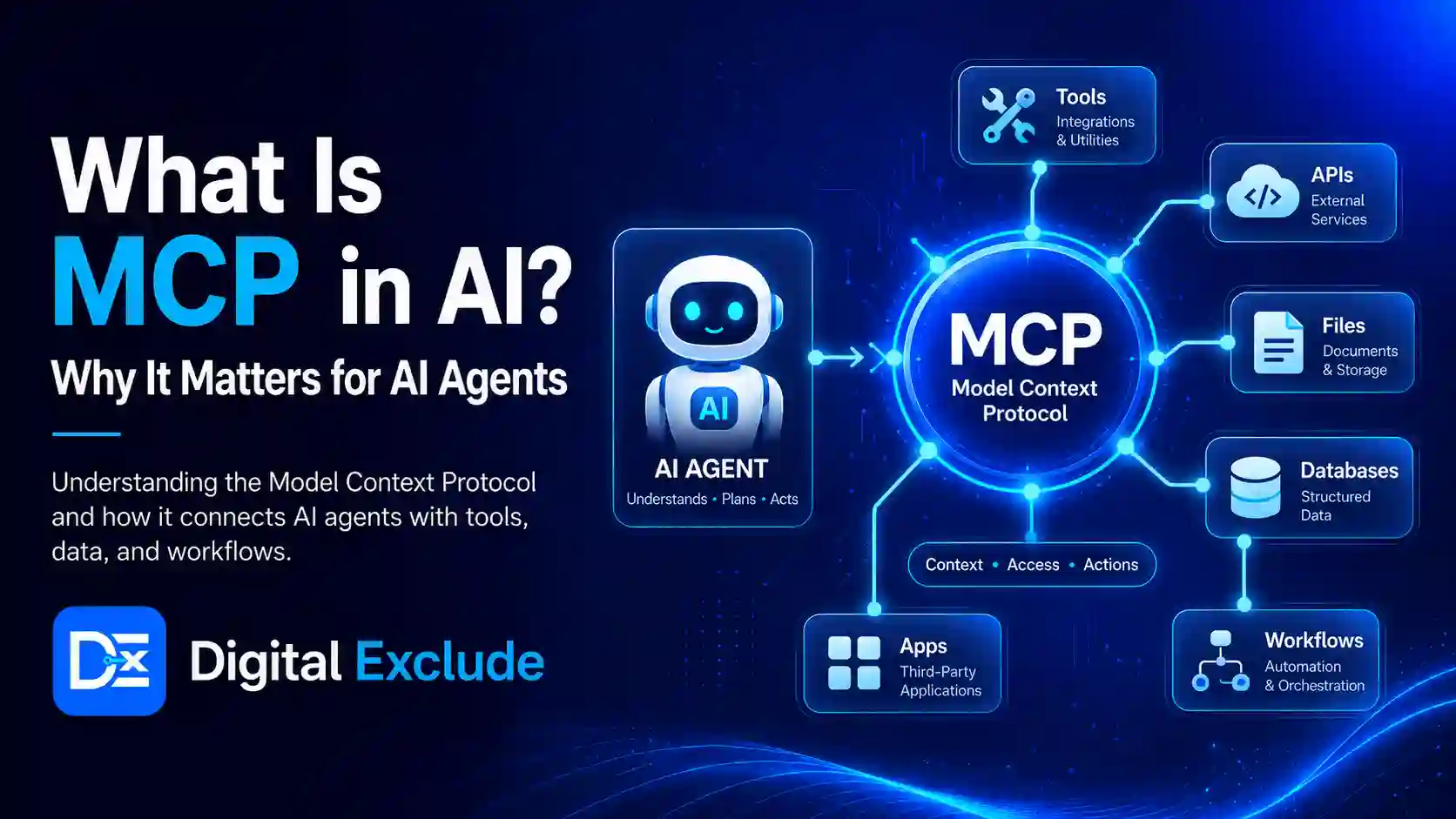
MCP in AI means Model Context Protocol, an open standard that helps AI applications and AI agents connect with external tools, files, databases, APIs, and business systems in a structured way. Instead of building a separate custom integration for every tool, MCP gives developers a common protocol for connecting AI systems to real data and actions.
For AI beginners, MCP is easiest to understand as a standard connection layer. For developers and SaaS teams, it helps reduce integration complexity. For automation users, it explains how AI agents can work with calendars, documents, code repositories, CRMs, search tools, and internal systems while still needing permission, security checks, and human review. The official MCP documentation describes it as an open source standard for connecting AI applications to external systems, including data sources, tools, and workflows.
Introduction
Many people now use AI tools for writing, coding, research, automation, and business workflows. But a normal AI model has a limitation: it does not automatically know what is inside your Google Drive, Slack, database, calendar, CRM, local files, project documents, or company tools.
This is where MCP in AI becomes important. AI agents need a safe and structured way to connect with external systems. Without a standard like MCP, every AI app may need its own custom connector for every tool. That creates extra development work, security risk, duplicated logic, and inconsistent user experience.
This article explains what Model Context Protocol means, how it works, why it matters for AI agents, and where users should be careful before connecting AI to business systems.
What Is MCP in AI?
MCP in AI is a protocol that lets AI applications connect to external tools and data sources through a common standard. MCP stands for Model Context Protocol.
In simple words, MCP helps an AI assistant or AI agent access useful context outside the model. That context may come from:
- Local files
- Cloud documents
- Databases
- Search tools
- Code repositories
- CRM systems
- Calendar apps
- Note-taking tools
- Project management platforms
- APIs
- Business workflows
- Custom internal tools
The official MCP introduction compares it to a USB-C port for AI applications because it gives different AI apps a standard way to connect with external systems.
Simple Example
Imagine you ask an AI agent:
“Check my project notes, find the pending client tasks, create a summary, and draft a follow-up email.”
Without a tool connection, the AI can only give a general answer.
With MCP, the AI app may connect to approved tools such as your notes app, calendar, email draft system, and project tracker. It can then access relevant information and help complete the task.
That does not mean the AI should act freely. Sensitive actions, such as sending emails, deleting files, changing customer records, or making payments, should still require approval.
Why MCP in AI Matters in 2026
MCP matters in 2026 because AI is moving from simple chat to connected agents. AI agents are expected to do more than answer questions. They may plan tasks, retrieve information, call tools, update records, generate reports, and help users complete work across apps.
Anthropic introduced MCP in November 2024 as an open standard for connecting AI assistants to systems where data lives, including content repositories, business tools, and development environments. Anthropic also explained that MCP replaces fragmented custom integrations with a single protocol for connecting AI systems with data sources.
OpenAI’s developer documentation also describes MCP as an open protocol that is becoming an industry standard for extending AI models with additional tools and knowledge. It notes that remote MCP servers can connect models over the internet to new data sources and capabilities.
For developers, SaaS teams, and automation users, this matters because AI integrations are becoming part of real workflows. An AI agent may need to connect to many systems, and MCP provides a more consistent way to expose tools and context to those agents.
How Does Model Context Protocol Work?
MCP has a few important parts. You do not need to be a backend engineer to understand the basic idea.
| MCP Part | Simple Meaning | Example |
| MCP Host | The AI app the user interacts with | Claude, ChatGPT, coding assistant, desktop AI app |
| MCP Client | The connection layer inside the AI app | Handles communication with MCP servers |
| MCP Server | A service that exposes tools or data | Google Drive server, database server, GitHub server |
| Tools | Actions the AI can request | Search files, create a task, fetch a record |
| Resources | Data that the AI can read | Document, database row, file, report |
| Prompts | Reusable workflows or instructions | “Summarise meeting notes” or “Create release report.” |
How the Flow Works
A normal MCP workflow looks like this:
- The user asks the AI app to do something.
- The AI app checks whether an MCP server is connected.
- The MCP server lists available tools or data.
- The AI model decides which tool may help.
- The system may ask for user or developer approval.
- The tool is called.
- The result is returned to the AI app.
- The AI gives an answer or suggests the next action.
OpenAI’s MCP and connectors documentation explains that connectors and remote MCP servers give models new capabilities and can allow the model to connect to and control external services when needed. It also says tool calls can be allowed automatically or restricted with explicit approval by the developer.
Why Do AI Agents Need MCP?
AI agents need access to tools and data if they are expected to complete real tasks. A disconnected AI model can write, reason, and explain. A connected AI agent can also retrieve, compare, update, and act with approved tools.
AI Agent Without MCP
A user asks:
“Review my sales notes and prepare a customer follow-up plan.”
The AI may reply:
“Please upload your notes.”
It cannot access the user’s actual sales notes unless the user provides them manually or a separate integration exists.
AI Agent With MCP
The AI app may connect to an approved notes app or CRM through MCP. It can fetch relevant notes, identify pending tasks, and prepare a follow-up plan.
This is why MCP AI agents are more practical for real workflows.
What Problems Does MCP Solve?
1. It Reduces Custom Integration Work
Without MCP, every AI app may need custom code for every external system.
Example:
- One custom connector for Google Drive
- One for Slack
- One for GitHub
- One for Notion
- One for Salesforce
- One for a company database
With MCP, developers can build or use MCP servers that expose tools and data in a standardized way. Anthropic says MCP provides a universal protocol where developers implement MCP once in their agent and unlock an ecosystem of integrations.
2. It Helps AI Agents Access Better Context
AI responses are better when the model has relevant context.
For example, an AI coding assistant becomes more useful when it can access:
- Project files
- Documentation
- Git history
- Issue tracker
- Test results
- Build logs
This is why MCP is important for AI app development, coding tools, business agents, and automation workflows.
3. It Makes Tool Connections More Consistent
MCP gives developers a common way to define tools and resources. This makes it easier for AI apps to discover what a connected server can do.
OpenAI’s MCP documentation explains that when a remote MCP server is specified, the API attempts to retrieve the list of tools from that server, and the imported tools can then be used by the model.
4. It Supports More Capable AI Integrations
MCP can connect AI applications to many types of systems. The official MCP documentation lists examples such as Google Calendar, Notion, Figma, databases, and specialized workflows.
For SaaS teams, this means AI can become part of customer support, analytics, operations, content workflows, internal search, and product automation.
5. It Makes Security Conversations More Concrete
MCP does not automatically make an AI tool connection safe. But it gives teams a clear layer where they can think about permissions, access, authentication, approval, tool scope, logs, and data sharing.
The official MCP security best practices document identifies MCP-specific risks such as confused deputy problems, token passthrough, server-side request forgery, session hijacking, local server compromise, and scope minimization concerns.
Main Practical Guide: How MCP Works in Real AI Workflows
1. MCP for AI Beginners
For beginners, MCP is best understood as a bridge between AI and tools.
Example:
You ask an AI assistant:
“Find my latest project notes and make a summary.”
The AI cannot do that unless it can connect to your notes. MCP provides a standard method for that connection.
Beginner rule:
Do not connect every tool just because it is possible. Connect only what the AI needs for the task.
2. MCP for Developers
Developers can use MCP to expose app features or data to AI agents.
Example:
A developer builds an MCP server for a project management app. The server may expose tools like:
- list_tasks
- create_task
- update_task_status
- search_projects
- get_project_summary
An AI agent can then call these tools when the user asks for project updates.
Developer rule:
Design tools with a limited scope. A tool called delete_all_customer_data should not be casually exposed to an AI agent.
3. MCP for SaaS Teams
SaaS teams can use MCP to make their products easier to connect with AI workflows.
Example:
A CRM company may create an MCP server so AI agents can:
- Search contacts
- Find deal status
- Summarise account history
- Draft follow-up actions
- Create tasks for sales teams
This improves AI integrations without forcing every AI vendor to build a separate custom connector.
SaaS team rule:
Treat MCP access like API access. Use authentication, authorization, logging, rate limits, user consent, and clear scopes.
4. MCP for Automation Users
Automation users may use MCP through tools that connect AI agents to calendars, documents, email drafts, spreadsheets, and internal systems.
Example:
An automation user asks:
“Check my meeting notes, create action items, and add deadlines to my task manager.”
MCP can help an AI agent connect the notes app and task manager in a structured way.
Automation rule:
Keep approval required for actions that change data, send messages, or affect customers.
Real World Examples of MCP in AI
Example 1: AI Agent Connected to Google Calendar
A user asks:
“What meetings do I have today, and which ones need preparation?”
With an approved MCP connection, the AI can check the calendar, identify meetings, and suggest preparation notes.
Where to be careful:
Calendar data may include private client names, meeting links, and personal schedules. Use limited access and avoid sharing unnecessary data.
Example 2: Developer Using MCP With a Codebase
A developer asks an AI coding assistant:
“Find all files related to checkout validation and explain how the flow works.”
With MCP support, the assistant may access project files, issue trackers, or documentation.
Where to be careful:
Do not expose secrets, .env files, API keys, production logs, or private customer data.
Example 3: SaaS Support Agent
A support team uses an AI agent to answer customer questions.
With MCP, the agent may connect to:
- Help center articles
- Customer subscription status
- Support tickets
- Product documentation
The agent can answer faster because it has better context.
Where to be careful:
The agent should not show one customer’s data to another customer. Access control is critical.
Example 4: Business Reporting Agent
A small SaaS team asks:
“Create a weekly revenue summary from our database and highlight churn risk.”
An MCP server could expose approved reporting tools to the AI agent.
Where to be careful:
Revenue, customer, and billing data should require strict access controls, audit logs, and approval for exports.
Example 5: Personal Productivity Assistant
A user asks:
“Check my tasks, emails, and notes, then prepare a daily plan.”
MCP can help connect the assistant to multiple approved tools.
Where to be careful:
Email access is sensitive. The assistant should draft messages, not send them automatically unless the user confirms.
MCP vs API vs Plugin vs Connector
| Term | What It Means | Best Example |
| API | A way for software systems to communicate | A CRM API that returns customer data |
| Plugin | A feature extension built for a specific app | A plugin inside one AI chat product |
| Connector | A connection to a specific external service | Google Drive connector |
| MCP | A standard protocol for AI apps to connect with tools and data | One MCP server exposing tools to multiple AI clients |
Simple Explanation
An API is like a door into a system.
A connector is like a ready-made cable to one system.
A plugin is often tied to one app.
MCP is like a standard connection method for AI applications and agents.
MCP vs Traditional Integrations
| Area | Traditional Integration | MCP-Based Integration |
| Development work | Custom integration per tool | Standard protocol for AI tool connection |
| Reuse | Often limited to one app | Can work across MCP-compatible clients |
| AI context | May be fragmented | Tools and resources are exposed in a structured way |
| Scaling | Harder as tools increase | Easier to connect multiple tools |
| Security | Depends on each integration | Still depends on implementation, but security can be planned at the protocol layer |
| Best use | Fixed app-to-app workflows | AI agents, tool use, business data access, automation |
Benefits of MCP in AI
| Benefit | Why It Matters |
| Standardized tool connection | Reduces repeated integration work |
| Better context for AI agents | Helps AI give more relevant answers |
| Works across many systems | Useful for SaaS, coding, business, and productivity tools |
| Supports agent workflows | Helps AI agents take useful actions with tools |
| Improves developer experience | Developers can build one MCP server instead of many custom connectors |
| Makes access planning clearer | Teams can define scopes, permissions, and approvals |
Limitations of MCP in AI
MCP is useful, but it is not magic.
1. MCP Does Not Guarantee Security
A poorly built MCP server can still expose sensitive data or unsafe actions.
OpenAI warns that remote MCP servers may be third-party services, may not be verified by OpenAI, and can allow models to access, send, receive data, and take action in connected services. OpenAI recommends reviewing the data shared with MCP servers carefully and notes that approvals are required by default in the Responses API MCP tool.
2. MCP Does Not Make AI Always Correct
Even with tool access, an AI agent can misunderstand the user’s goal, choose the wrong tool, or interpret results incorrectly.
3. MCP Can Increase Data Exposure
The more systems an AI agent can access, the more careful teams must be with permissions.
4. MCP Servers Need Maintenance
A server must be updated, monitored, secured, documented, and tested.
5. Tool Overload Can Increase Cost and Latency
Anthropic’s engineering article explains that as MCP usage scales, loading many tool definitions and passing intermediate results through the model context can increase token consumption, cost, and latency.
Common Mistakes to Avoid
Mistake 1: Connecting Too Many Tools Too Quickly
Do not connect email, files, CRM, database, calendar, and payment tools at once.
Better approach:
Start with one low-risk tool, test the workflow, then expand.
Mistake 2: Giving Broad Permissions
An AI agent does not need full admin access for most tasks.
Better approach:
Use read-only access where possible. Add write access only when needed.
Mistake 3: Skipping User Approval
Sending emails, deleting records, updating customer data, or making purchases should require approval.
Better approach:
Use explicit approval for high-impact actions.
Mistake 4: Ignoring Prompt Injection
Prompt injection can happen when untrusted content tries to manipulate the AI system or tool behavior.
OpenAI specifically calls prompt injection an important security consideration when models are given access to MCP servers and connectors that can access sensitive data or take action.
Mistake 5: Trusting Unofficial MCP Servers Blindly
An unofficial MCP server may ask for data you should not share.
Better approach:
Prefer official servers hosted by the service provider where possible. OpenAI gives similar guidance for remote MCP servers and recommends trusting the domains and services involved before using tool outputs or URLs.
Mistake 6: Not Logging Tool Actions
If an AI agent updates a task, reads a record, or sends a request, teams should know what happened.
Better approach:
Keep logs of tool calls, user approvals, errors, and changed records.
Best Practices: Step-by-Step Tips for Using MCP Safely
Step 1: Define the Use Case
Do not start with “connect our AI to everything.”
Start with one clear workflow:
- Search internal documentation
- Summarise meeting notes
- Create support ticket drafts
- Check project status
- Retrieve product information
- Read non-sensitive reports
- Draft customer follow-ups
Step 2: Choose the Right Data Access Level
Use the least access needed.
| Task | Better Access Level |
| Summarise public docs | Read only |
| Search help center | Read only |
| Draft support replies | Read plus draft creation |
| Update CRM fields | Limited write access |
| Delete records | Avoid or require admin approval |
| Send emails | Draft first, send after user confirmation |
Step 3: Use Trusted MCP Servers
Before connecting an MCP server, check:
- Who operates it
- What data can it access
- Whether it is official or third-party
- What permissions does it request
- Whether it supports authentication
- Whether it logs activity
- Whether it has clear documentation
- Whether it is actively maintained
Step 4: Require Approval for Sensitive Actions
Approval should be required for:
- Sending messages
- Deleting files
- Updating customer records
- Exporting data
- Making payments
- Changing permissions
- Running code
- Modifying production systems
Step 5: Protect Secrets and Tokens
Never expose:
- API keys
- OAuth tokens
- Passwords
- Database credentials
- Private keys
- Session cookies
- Customer records
- Production logs with personal data
Step 6: Monitor Tool Calls
Track:
- Which tool was called
- Who requested it
- What data was returned
- What action was taken
- Whether user approval was given
- Whether the action succeeded or failed
Step 7: Test With Dummy Data First
Before using MCP with real business data, test with sample data.
Example:
Use fake customer records before connecting to a real CRM.
Step 8: Review Cost and Performance
MCP can make agents more useful, but connected tools may increase tokens, API calls, server usage, and latency.
Ask:
- How many tools are loaded?
- How large are tool responses?
- Are results filtered before reaching the model?
- Are repeated calls cached safely?
- Are long-running workflows controlled?
MCP Security Checklist
| Security Area | Question to Ask |
| Authentication | Does the MCP server verify who is connecting? |
| Authorization | Can users access only what they should? |
| Scope | Are tool permissions limited? |
| Approval | Are sensitive actions confirmed by the user? |
| Logging | Are tool calls recorded? |
| Data minimization | Is only the necessary data shared? |
| Prompt injection | Is untrusted content handled carefully? |
| Secrets | Are tokens and API keys protected? |
| Vendor trust | Is the MCP server official or trusted? |
| Error handling | Does the system fail safely? |
Final Recommendation
MCP is important because it gives AI agents a practical way to connect with tools, data, APIs, and business systems. For AI beginners, it explains how agents move beyond simple chat. For developers, it reduces repeated integration work. For SaaS teams, it can make products easier to connect with AI workflows. For automation users, it helps agents complete useful tasks across apps.
But MCP should not be treated as a free pass for AI automation. Start small, use read-only access first, prefer trusted MCP servers, require approval for sensitive actions, protect tokens, and monitor tool activity. The best MCP setup is one that gives the AI enough context to help without giving it unnecessary control.
FAQs
-
What is MCP in AI?
MCP in AI means Model Context Protocol. It is an open standard that helps AI applications and AI agents connect with external tools, files, databases, APIs, and business systems.
-
What does Model Context Protocol do?
Model Context Protocol gives AI applications a structured way to access tools, data sources, and workflows. This helps AI agents retrieve useful context and take approved actions.
-
Why is MCP important for AI agents?
MCP is important because AI agents need controlled access to external systems to complete real tasks. It helps connect agents to calendars, files, databases, code repositories, CRMs, and other business tools.
-
Is MCP safe?
MCP can be safe when implemented with strong authentication, limited permissions, approval flows, logging, and careful data handling. It can be risky if servers are untrusted or permissions are too broad.
-
Can MCP be used with Claude?
Yes. MCP was introduced by Anthropic and is used in Claude-related workflows. The official MCP documentation also lists Claude among AI applications that support MCP.
Conclusion
MCP in AI is important because AI agents need a reliable way to connect with real tools, files, APIs, and business systems. The Model Context Protocol gives developers and SaaS teams a common method for exposing data and actions to AI applications, which can make AI integrations easier to build and reuse.
At the same time, MCP should be used carefully. Connected AI agents can access sensitive data and take meaningful actions, so security, privacy, approvals, and logging matter from the beginning. For AI beginners, MCP explains how agents become useful beyond chat. For developers and SaaS teams, it is a practical protocol for building safer and more consistent AI integrations.