Google Search no longer gives every user the same simple experience of typing a keyword, scanning blue links, and opening several websites.
A search may now produce an AI-generated summary at the top of the results page. Users can also enter Google AI Mode, ask a more detailed question, upload an image, continue with follow-up questions, and explore a topic through a conversation.
This creates understandable confusion.
Are AI Mode and AI Overviews two versions of the same feature? Does AI Mode simply provide a longer answer? Will users still need to visit websites? More importantly, which experience should someone use for a quick fact, product comparison, technical problem, or important purchase?
The simplest explanation is this:
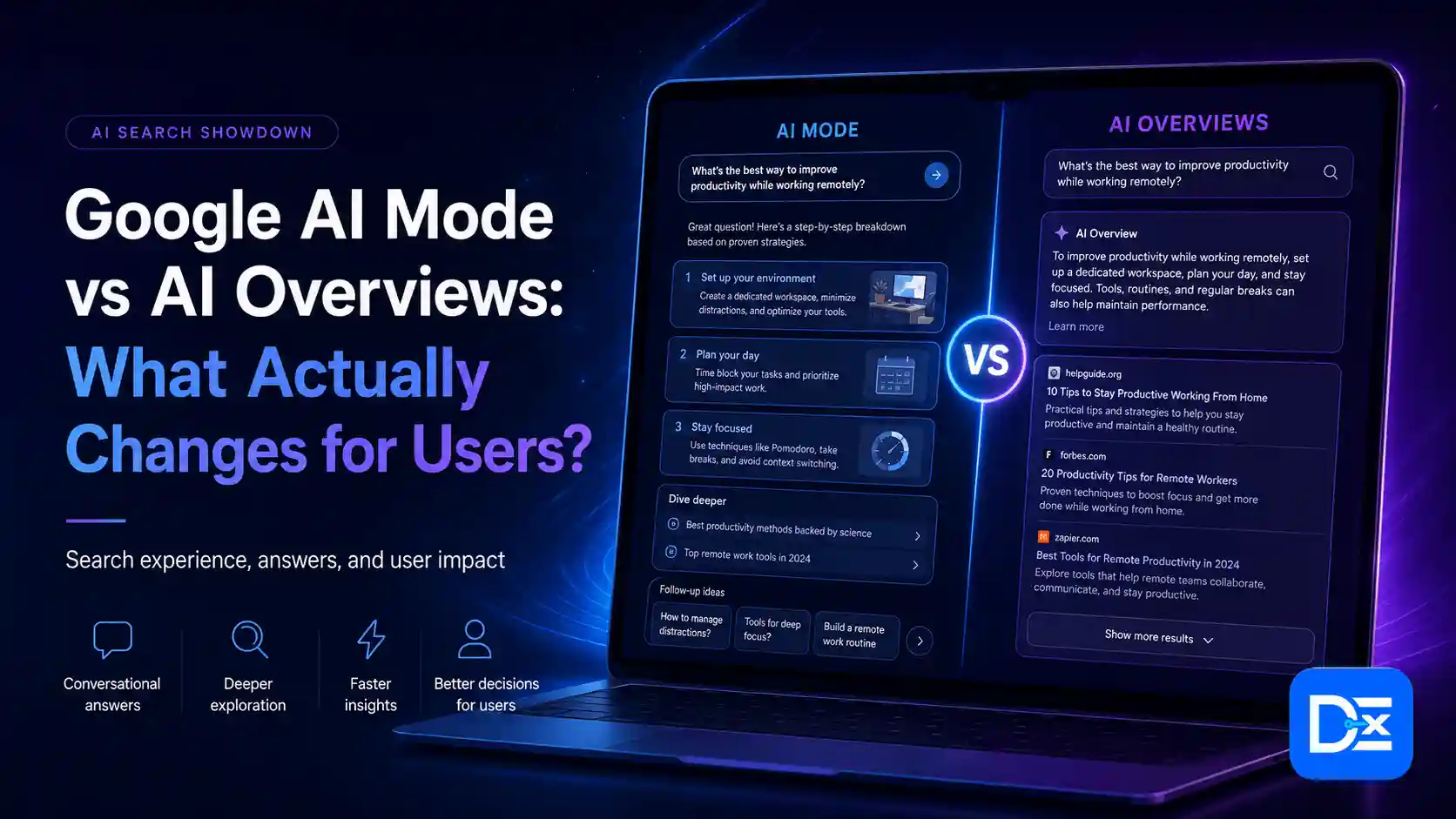
AI Overviews help users understand a topic quickly. AI Mode helps users investigate, compare, refine, and make decisions.
However, the real difference goes much deeper than answer length. The two experiences can change how people phrase questions, evaluate sources, compare brands, revisit search results, and decide whether to click a website.
Quick Answer
Google AI Overviews are AI-generated snapshots that appear within the regular search results when Google believes a summary will help the user understand a question.
Google AI Mode is a conversational search experience designed for more detailed research, planning, comparisons, and follow-up questions. Users can provide more context, refine the answer, and continue exploring without starting a completely new search.
The two experiences are also becoming more connected. Google has introduced the ability to continue from an AI Overview into an AI Mode conversation while preserving the context of the original query on supported devices and in supported regions.
For users, the biggest change is that Google Search is becoming less like a list of pages and more like a guided research session.
Google AI Mode vs AI Overviews at a Glance
| User question | AI Overviews | Google AI Mode |
| Where does it appear? | Inside the regular Google results page | In a dedicated AI search experience |
| How does it start? | Google may show it automatically | The user opens AI Mode or continues from an AI Overview |
| What is it best for? | Quick understanding and initial research | Complex research, comparisons, planning, and problem-solving |
| Can users ask follow-up questions? | Users may continue the query into AI Mode | Yes, follow-up questions are a core feature |
| How detailed is the response? | Usually concise | Usually longer and more comprehensive |
| Can users provide extra context? | Limited in the initial result | Yes, users can add requirements and refine the question |
| Does it support images or voice? | The standard search experience may include visual features | AI Mode supports text, voice, images, and other supported file inputs |
| Are websites still shown? | Yes, through citations and regular results | Yes, through supporting links |
| Are the same sources always used? | No | No |
| Is the answer always accurate? | No | No |
| Best user mindset | “Help me understand this quickly” | “Help me research and decide” |
What Are Google AI Overviews?
Google AI Overviews are AI-generated summaries that appear within regular Google Search results.
They are designed to help users understand the main points of a question without immediately opening several websites. An overview may include a short explanation, steps, product information, images, supporting sources, or links to explore the topic further.
According to Google Search Central, AI Overviews are intended for searches where an AI response adds something useful beyond the standard search results. They do not appear for every query.
An AI Overview may be useful when someone searches for:
- How solar panels reduce electricity costs
- What causes a website to load slowly
- How to prepare for a software migration
- What zero-trust security means
- How compound interest works
- What to consider before buying a standing desk
The user receives an initial explanation while still remaining on the familiar Google results page.
AI Overviews Do Not Simply Copy the First Result
An AI Overview should not be treated as a rewritten version of the number-one organic result.
Google may run related searches, retrieve information from different sources, and combine relevant points into one response. Google states that both AI Overviews and AI Mode may use a process called query fan-out, which involves searching across related subtopics and data sources.
This means an overview can cite pages that are not identical to the first few organic results.
AI Overviews Are No Longer Completely Isolated
Earlier explanations often described AI Overviews as static summaries that offered no conversational interaction.
That description is now incomplete.
Google allows users on supported experiences to ask a follow-up question from an AI Overview and continue into AI Mode. The original search context can carry into the conversation, so the user does not always need to restart the research process.
The AI Overview remains the quick-answer layer, while AI Mode provides the deeper conversational layer.
What Is Google AI Mode?
Google AI Mode is a more interactive search experience for questions that require deeper exploration, comparison, reasoning, or planning.
Instead of entering several separate keywords, a user can explain the entire situation in one prompt.
A traditional search might be:
best CRM software
An AI Mode search might be:
Compare CRM platforms for a 20-person real estate company. We need email automation, lead routing, mobile access, QuickBooks integration, and a monthly budget below $1,500.
The user could then ask:
Which two options would require the least migration work?
AI Mode keeps the context and provides a more specific response.
Google’s help documentation says users can ask questions through text, voice, or images, explore information from multiple web sources, ask follow-up questions, and return to previous AI Mode searches through search history. Capabilities can vary by device, account, location, and feature availability.
For a broader introduction, read Digital Exclude’s guide explaining what Google AI Mode is and how it changes Search.
Why This Comparison Matters to Everyday Users
AI-generated summaries are no longer a niche part of search behavior.
A Pew Research Center survey found that 60% of U.S. adults said they read AI summaries at the top of search results.
That level of exposure means users need to understand more than where the features appear. They need to understand how each feature may influence what they see, what they trust, and which websites or products they consider.
What Actually Changes for Users?
1. Searches Become Longer and More Specific
Traditional Google searches are often short because users expect to refine the search manually.
Examples include:
- project management software
- best laptop for developers
- plumber near me
- reduce cloud costs
AI Mode encourages users to explain the full situation.
Examples include:
- Compare project management platforms for a remote marketing agency with 15 employees, guest clients, time tracking, and a limited monthly budget.
- Recommend a laptop for a software developer who uses Docker, Android Studio, and two external monitors.
- Find a local plumber who offers emergency service, has strong customer reviews, and provides upfront pricing.
- Explain how a SaaS startup can reduce AWS costs without slowing product development.
This gives Google more context from the beginning. It may also reduce the number of separate searches the user needs to perform.
What This Means in Practice
Users need to become better at explaining:
- Their goal
- Budget
- Location
- Technical requirements
- Experience level
- Preferred features
- Limitations
- Time frame
- What they have already tried
A detailed prompt will not guarantee a perfect answer, but it usually gives AI Mode more useful context than a two-word keyword.
2. Search Becomes a Conversation
The most important behavioral change is continuity.
In a traditional search journey, a user may type:
- Best email marketing tools
- Email marketing tools for ecommerce
- Email marketing tools with Shopify
- Cheapest Shopify email tool
- Klaviyo alternatives
Each query begins a separate search.
In AI Mode, the user can begin with one detailed question and continue:
- Compare email marketing platforms for a small Shopify store.
- Which ones support abandoned-cart automation?
- Remove any option that costs more than $200 per month.
- Which platform is easiest for a two-person team?
- What are the disadvantages of the top two?
The user does not need to repeat the entire situation every time.
This is similar to how an experienced consultant asks follow-up questions before making a recommendation.
3. Users May Open Fewer Tabs
Traditional research often involves tab management.
A user opens five articles, three product pages, two Reddit discussions, and one YouTube review. They then try to remember which source mentioned pricing, security, customer service, or a product limitation.
AI Mode can perform part of that synthesis inside the search experience.
It may:
- Organize several factors into categories
- Compare products in a table
- Explain common trade-offs
- Combine information from several sources
- Suggest follow-up questions
- Narrow a long list into a smaller group
This can save time, particularly during early research.
However, fewer open tabs do not automatically mean better research. The user may see only the information that Google selected and summarized. Important alternatives, contradictory evidence, or recent changes may still be missing.
4. AI Mode and AI Overviews May Use Different Sources
One of the biggest user misconceptions is that AI Mode simply expands the AI Overview using the same websites.
Large-scale research suggests otherwise.
Ahrefs analyzed 730,000 paired responses and found:
- Only 13.7% citation overlap between AI Mode and AI Overviews
- Only 16% word-level overlap
- An average semantic similarity of 86%
- AI Mode answers that were approximately four times longer
The systems frequently reached similar conclusions while using different words and citing different sources.
This matters to users because switching to AI Mode may introduce:
- Different publishers
- Different product recommendations
- Additional brands
- Different expert opinions
- More detailed reference material
- Sources that did not appear in the initial overview
The Ahrefs study compared individual generations of each response, so the numbers should not be interpreted as permanent Google rules. AI-generated answers and citations may change when the same query is repeated.
5. Users Spend More Time Evaluating the Results Page
AI Overviews do not always cause users to accept the first answer and leave.
Some users pause, scan the page, return to previous results, and compare what they have already seen.
A clickstream analysis of approximately 846,000 U.S. Google sessions found that users who reversed their scrolling direction spent a median 47.5% of their scrolling movement going back up the page when an AI Overview was present. The equivalent figure without an AI Overview was 27%.
The study also found that users paused their cursor more often and covered a larger portion of the visible page when an AI Overview appeared.
The data suggests a more deliberate comparison process:
- Read part of the overview.
- Review a cited source.
- Scan organic listings.
- Scroll farther down.
- Return to an earlier result.
- Compare the result titles and descriptions.
- Decide whether a website deserves a click.
Cursor movement is not a perfect measurement of attention, and the study population may have included more search-savvy users than the general public. Still, the findings provide useful evidence that AI Overviews can change the results page into a more active comparison environment.
6. Users Click Websites Less Frequently for Some Searches
AI summaries can satisfy basic informational needs without requiring a website visit.
Pew Research Center analyzed 68,879 Google searches associated with browsing data from 900 U.S. adults.
The study found:
- Users clicked a traditional result in 8% of visits when an AI summary appeared.
- Users clicked a traditional result in 15% of visits when no AI summary appeared.
- Users clicked a source cited within the AI summary in only 1% of visits.
- Users ended their browsing session in 26% of visits with an AI summary, compared with 16% without one.
The researchers noted that search results and AI summaries can change over time, so the findings reflect the search experience observed during the study period.
For users, this means Google may resolve more simple questions directly.
For complex questions, however, opening the original source remains important because the AI response may omit context, qualifications, methodology, or conflicting viewpoints.
7. Users Can Search With More Than Text
AI Mode supports multimodal search, which means the user can provide information in formats beyond typed keywords.
Depending on the available feature and device, users may search with:
- Text
- Voice
- Photos
- Uploaded images
- PDFs
- Live camera input
Google’s AI Mode help page says users can ask questions with text, voice, or images. On supported desktop experiences, users may also upload images or PDFs.
This creates several practical use cases.
A user could:
- Photograph a damaged appliance and ask what may be wrong
- Upload a software error screenshot
- Show a plant and ask how to care for it
- Upload a product image and search for similar options
- Submit a chart and ask for an explanation
- Upload a document and ask questions about its contents
The search process changes from “describe what I am seeing” to “show Google what I am seeing.”
8. Product and Service Decisions May Happen Earlier
A user can ask AI Mode to compare products or service providers before visiting a company website.
The response may organize options according to:
- Price
- Features
- Location
- Customer ratings
- Compatibility
- Availability
- Implementation difficulty
- Ideal customer type
- Common disadvantages
By the time the user reaches a website, they may already have:
- A shortlist
- A preferred option
- A budget expectation
- Concerns about specific features
- Questions about implementation
- Competitor comparisons
- A reason to reject certain providers
This makes the first website visit more important. The customer is not always beginning the research process. They may be validating a decision that began inside Google.
9. Search History and Personalization Can Affect the Experience
AI Mode can use search history and other permitted information to make responses more relevant to the individual user.
Google’s support documentation states that personalized AI Mode responses may reference previous searches and Search or Maps activity when the relevant settings are enabled. Google also provides optional connections to supported Google content apps for users who choose to enable those experiences.
This can improve convenience, but it also means users should review:
- Search history settings
- Personalization controls
- Connected applications
- Saved AI Mode activity
- Information included in prompts
- Images and files uploaded to Search
Users should avoid uploading confidential business records, customer data, private credentials, medical documents, passwords, API keys, or sensitive legal information without understanding how the feature handles their data.
For a broader explanation of how connected AI systems can be manipulated, read Digital Exclude’s guide to prompt injection risks and safety practices.
Real-World Examples
Example 1: Choosing Business Software
What an AI Overview May Do
A user searches:
best CRM software for small businesses
The AI Overview may provide:
- A definition of CRM software
- Several popular platforms
- A few selection criteria
- Links to product pages or comparison articles
- Organic results beneath the summary
This can help the user understand the market quickly.
What AI Mode May Do
The user adds:
We have 18 employees, a five-person sales team, QuickBooks, Gmail, and a budget of $800 per month.
AI Mode may compare a smaller set of products against those requirements.
The user can then ask:
- Which option is easiest to implement?
- Which one provides the best mobile app?
- What hidden costs should I expect?
- Which one is unsuitable for our team?
- What should we test during a free trial?
The result becomes more specific because the user has provided business context.
User Takeaway
Use an AI Overview to understand the product category. Use AI Mode to narrow options based on actual requirements. Verify pricing, integrations, contract terms, and feature availability on the official product websites before buying.
Example 2: Planning a Trip
What an AI Overview May Do
A user searches:
best time to visit Seattle
The overview may summarize:
- Typical weather
- Tourist seasons
- Common events
- General cost differences
- Popular attractions
What AI Mode May Do
The user asks:
Plan a four-day Seattle trip for two adults who enjoy coffee, museums, and seafood. Avoid long hikes and keep the activity budget below $700.
The user may then refine the plan:
- Replace the seafood restaurant with a vegetarian option.
- Add one day trip without renting a car.
- Which attractions need advance booking?
- Rebuild the plan if rain is expected.
User Takeaway
AI Mode can help organize an itinerary, but users should confirm opening hours, prices, transportation schedules, reservation rules, and weather through official sources.
Example 3: Troubleshooting a Technical Problem
What an AI Overview May Do
A user searches:
laptop connected to Wi-Fi but no internet
The overview may provide common fixes:
- Restart the router
- Forget and reconnect to the network
- Run network troubleshooting
- Reset DNS settings
- Check whether other devices are affected
What AI Mode May Do
The user can add:
The laptop runs Windows, other devices work, and the problem started after installing a VPN.
AI Mode may narrow the likely causes and provide more relevant steps.
The user might upload a screenshot of the error message and ask:
- Which setting should I check first?
- Could the VPN kill switch cause this?
- How do I undo the last network change?
- Which steps could erase saved network information?
User Takeaway
AI Mode is useful when troubleshooting requires context. Users should avoid running unknown commands, deleting system files, changing security controls, or disabling protections without understanding the consequences.
Example 4: Choosing a Local Service Provider
What an AI Overview May Do
A user searches:
emergency plumber near me
The regular results page may show:
- An AI summary
- Local map listings
- Ratings
- Business hours
- Organic results
- Service-related information
What AI Mode May Do
The user may ask:
Find an emergency plumber that serves my area, is open now, has strong recent reviews, and provides pricing before beginning the work.
AI Mode may help organize suitable providers based on the available information.
User Takeaway
Confirm service areas, availability, licensing, insurance, callout charges, and final pricing directly with the provider. An AI recommendation should not replace direct confirmation.
When Should Users Choose AI Overviews?
AI Overviews are most useful when the user needs:
- A quick definition
- An introduction to an unfamiliar topic
- A concise explanation
- Basic instructions
- A summary of common considerations
- Initial research before exploring further
- A starting point for more specific questions
Examples include:
- What is serverless computing?
- Why do websites use cookies?
- How does two-factor authentication work?
- What causes email deliverability problems?
- What is link building?
An AI Overview can provide orientation without requiring a long research session.
When Should Users Choose AI Mode?
AI Mode is more useful when the user needs:
- A detailed product comparison
- Recommendations based on personal requirements
- A multi-step plan
- Troubleshooting with context
- Travel planning
- Software selection
- Research across several subtopics
- Follow-up questions
- Help refining a complex decision
- Analysis of an uploaded image or document
Examples include:
- Compare three cloud providers for a healthcare application with strict compliance requirements.
- Create a migration checklist for moving from spreadsheets to a CRM.
- Help me diagnose an Android battery problem using this screenshot.
- Plan a content strategy for a B2B SaaS product with a small marketing team.
- Compare two cybersecurity certifications based on cost, experience requirements, and career goals.
Can Users Trust AI Mode and AI Overviews?
Users should treat AI-generated search responses as useful research assistance, not unquestionable authority.
Google itself warns that AI Mode can make mistakes, misinterpret web content, or miss important context. Google recommends checking important information in more than one place and opening source links for verification.
Potential problems include:
- Outdated prices
- Incorrect product specifications
- Missing limitations
- Misunderstood user intent
- Conflicting source information
- Unsupported conclusions
- Incomplete medical or legal context
- Recommendations that exclude relevant alternatives
- A citation that supports only part of the generated statement
A Simple Verification Checklist
Before relying on an AI-generated answer:
- Open the cited source.
- Confirm that the source supports the specific claim.
- Check when the page was published or updated.
- Compare at least one independent source.
- Prefer official documentation for technical features and policies.
- Confirm prices and availability directly.
- Review the full terms before making a purchase.
- Consult a qualified professional for medical, legal, financial, or safety-critical decisions.
Questions Users Can Ask to Improve the Answer
Useful follow-up prompts include:
- What assumptions are you making?
- What information might be outdated?
- Show me the disadvantages of this recommendation.
- Compare this with an alternative viewpoint.
- Which claims should I verify independently?
- Use official sources where possible.
- What information is missing from this comparison?
- Explain why each source is relevant.
These questions do not guarantee accuracy, but they encourage a more critical research process.
Does AI Mode Replace Regular Google Search?
No.
AI Mode can reduce the effort required for certain research tasks, but regular search results remain necessary for:
- Visiting an official website
- Reading original research
- Reviewing complete documentation
- Checking breaking news
- Confirming prices
- Making purchases
- Booking appointments
- Reading detailed reviews
- Comparing independent opinions
- Accessing primary legal or government documents
- Verifying an AI-generated claim
Google describes AI Mode and AI Overviews as experiences that provide supporting web links and help users continue exploring information from across the web.
AI search changes how users reach websites. It does not remove the need for reliable websites.
What These Changes Mean for Businesses
The changes affect more than publishers and SEO professionals.
Software companies, local businesses, ecommerce stores, agencies, and professional service providers must now assume that customers may learn about their brand through an AI-generated answer before visiting their website.
1. Product and Service Information Must Be Clear
Businesses should publish accurate information about:
- Features
- Pricing
- Service areas
- Integrations
- Availability
- Limitations
- Ideal customers
- Implementation
- Support
- Returns
- Contracts
- Security and compliance
Vague marketing language gives search systems and customers very little useful information.
2. Content Must Answer Follow-Up Questions
A page should not stop after explaining the basic topic.
A software comparison should also answer:
- Which product is best for each team size?
- What does implementation require?
- Which integrations are supported?
- What are the hidden costs?
- Who should avoid the product?
- What are the main alternatives?
- How should a company test it?
Content that supports the full decision journey is more useful to customers whether they arrive through AI Mode, an AI Overview, or a traditional result.
3. Search Result Previews Need More Attention
The clickstream study discussed earlier suggests users may revisit and compare listings more carefully when an AI Overview appears.
Businesses should improve:
- Title tags
- Meta descriptions
- Brand positioning
- Publication dates
- Review signals
- Page headings
- Value propositions
A title such as “Software Solutions for Businesses” is too generic.
A stronger title would be:
Inventory Software for Multi-Location Retail Teams
The second version gives the user a clearer reason to click.
4. Original Information Becomes More Valuable
AI systems can summarize information that already exists.
They cannot replace the original source of:
- Proprietary research
- Customer surveys
- Internal benchmarks
- Expert interviews
- Testing data
- Original screenshots
- Industry reports
- Calculators
- Templates
- Case studies
- First-hand implementation experience
Businesses should invest in information assets that customers and other publishers have a reason to reference.
5. Backlinks and Brand Mentions Still Matter
Backlinks do not guarantee that a company will appear in AI Mode or an AI Overview.
However, relevant editorial backlinks and brand mentions can support:
- Content discovery
- Referral traffic
- Industry visibility
- Publisher relationships
- Distribution of original research
- Broader brand recognition
- Search authority
- Third-party validation
The objective should be relevance and editorial value, not the mass placement of low-quality links.
At Digital Exclude, we help software, service, product, and marketing companies strengthen their online authority through backlink acquisition, link-building outreach, and content-led promotion.
These services cannot guarantee an AI citation. They can help useful content reach relevant publishers, earn credible references, attract referral traffic, and build a stronger search presence around the brand.
Businesses looking to improve content promotion and authority can contact Digital Exclude to discuss backlink and link-building opportunities.
Common Misconceptions
AI Mode Is Just a Longer AI Overview
Not exactly. The two experiences can reach similar conclusions while using different language and sources.
Only AI Mode Uses Query Fan-Out
Incorrect. Google states that both AI Mode and AI Overviews may use query fan-out.
AI Overviews Never Support Follow-Up Questions
Outdated. Google has introduced a transition from AI Overviews into AI Mode conversations on supported experiences.
AI Answers Eliminate the Need for Websites
Incorrect. Users still need official sources, original research, detailed documentation, transactions, and independent verification.
Every AI Answer Uses the Same Sources
Incorrect. Sources can vary between AI Mode and AI Overviews, and they may also change when a query is repeated.
AI-Generated Answers Are Always Neutral
Not necessarily. An answer may reflect the available sources, Google’s selection process, missing information, personalization, or how the user phrased the question.
Final Verdict
AI Overviews and Google AI Mode are not simply short and long versions of the same answer.
AI Overviews help users understand a topic quickly within the normal search results. AI Mode gives users a deeper research environment where they can add context, compare options, upload visual information, and continue with follow-up questions.
What actually changes for users is the entire search process:
- Queries become longer.
- Search becomes conversational.
- Fewer tabs may be needed.
- Different sources may appear.
- Users may spend more time comparing results.
- Product decisions may begin before a website visit.
- Visual search becomes more useful.
- Personalization and search history play a larger role.
- Verification becomes more important.
Use an AI Overview to get oriented.
Use AI Mode to explore and refine.
Use original websites and authoritative sources to verify anything that could affect your money, health, security, legal rights, business, or safety.
Frequently Asked Questions
What is the main difference between Google AI Mode and AI Overviews?
AI Overviews provide a quick AI-generated snapshot within regular Google results. AI Mode provides a deeper conversational experience for research, comparisons, planning, and follow-up questions.
Do AI Mode and AI Overviews use the same websites?
Not always. Google says the two features may use different models and techniques. Large-scale Ahrefs research also found low citation overlap between paired responses.
Is AI Mode better than an AI Overview?
Neither is universally better. AI Overviews are more convenient for quick understanding. AI Mode is more useful for complex questions that require additional context or refinement.
Can AI Mode search with an image?
Yes, AI Mode supports image-based questions on supported devices and experiences. Users can upload an image or take a photo and then ask follow-up questions.