Whether you are buying an SSD, checking a phone’s storage, moving files to the cloud, or planning business backups, you need to understand how digital storage is measured.
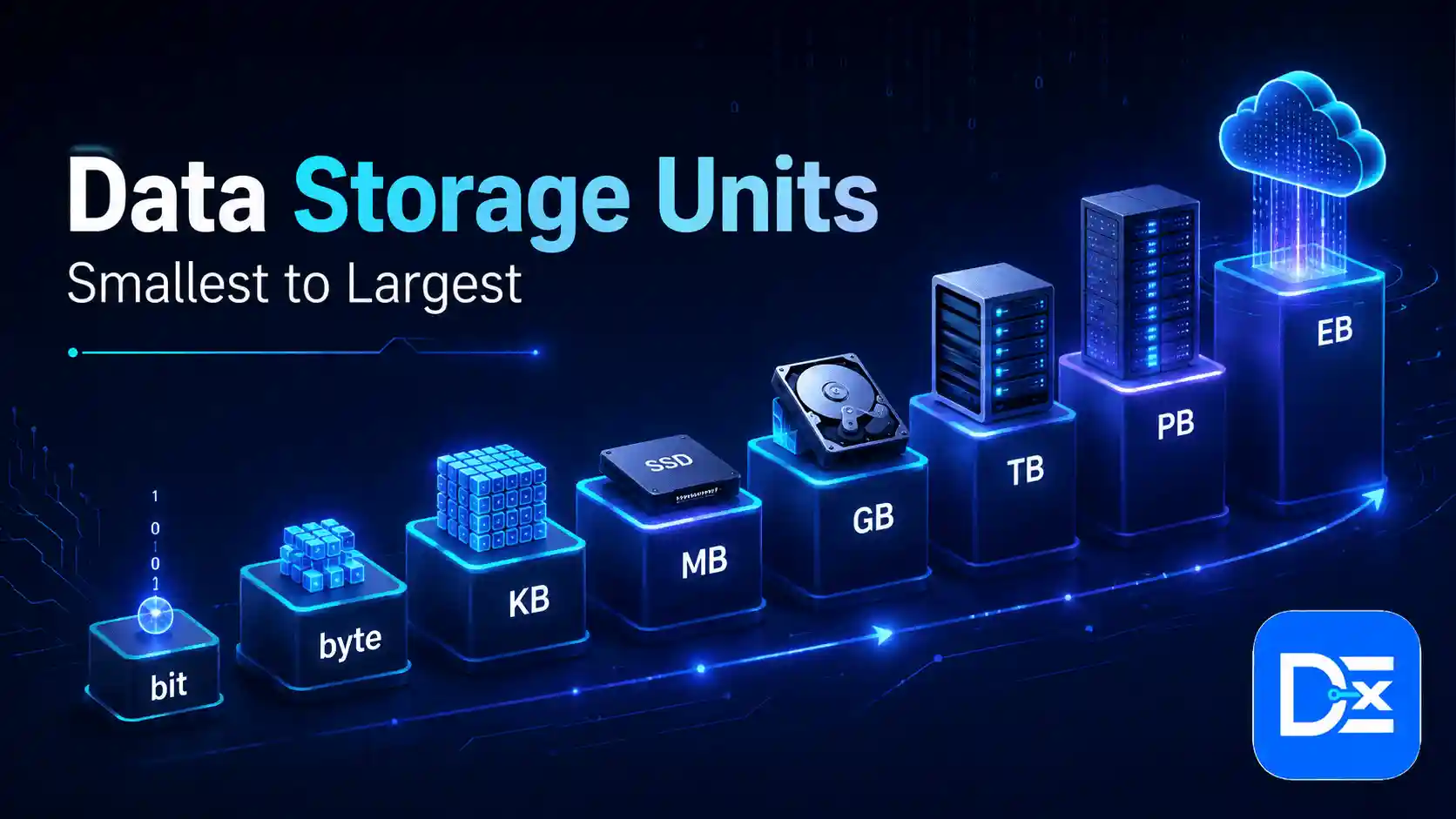
The basic order of data storage units is bit, byte, kilobyte, megabyte, gigabyte, terabyte, petabyte, exabyte, zettabyte, yottabyte, ronnabyte, and quettabyte.
The confusing part is that two measurement systems are commonly encountered. Decimal units such as KB, MB, GB, and TB are based on powers of 1,000, while binary units such as KiB, MiB, GiB, and TiB are based on powers of 1,024.
That difference explains why a 1 TB drive can appear to have roughly 931 GiB of capacity.
Data Storage Units Chart From Smallest to Largest
| Unit | Symbol | Decimal Size |
| Bit | b | 0 or 1 |
| Nibble | 4 bits | |
| Byte | B | 8 bits |
| Kilobyte | KB | 1,000 bytes |
| Megabyte | MB | 1,000 KB |
| Gigabyte | GB | 1,000 MB |
| Terabyte | TB | 1,000 GB |
| Petabyte | PB | 1,000 TB |
| Exabyte | EB | 1,000 PB |
| Zettabyte | ZB | 1,000 EB |
| Yottabyte | YB | 1,000 ZB |
| Ronnabyte | RB | 10²⁷ bytes |
| Quettabyte | QB | 10³⁰ bytes |
Many older charts stop at yottabyte. That is now incomplete.
The General Conference on Weights and Measures officially added ronna for 10²⁷ and quetta for 10³⁰ in 2022. The decision specifically recognized that fields such as data science could eventually need prefixes beyond 10²⁴.
For the official definitions, see NIST’s SI prefix guidance.
Understanding the Main Computer Storage Units
Bit, Nibble, and Byte
A bit, short for binary digit, is the smallest basic unit of digital information. It can represent either:
0 or 1
A nibble contains four bits.
A byte contains eight bits:
1 byte = 8 bits
Bytes form the basis of most storage measurements.
You may hear that one byte stores one character. That is a useful beginner example, but it is not universally true. Basic ASCII characters can use one byte, while characters represented through modern Unicode encodings may require multiple bytes.
KB, MB, GB, and TB
These are the units most people use in everyday computing.
Kilobyte: 1 KB equals 1,000 bytes. Kilobytes are commonly used for small text files, configuration files, and lightweight digital assets.
Megabyte: 1 MB equals 1 million bytes. Photos, PDFs, compressed audio, documents, and smaller applications are often measured in megabytes.
Gigabyte: 1 GB equals 1 billion bytes. Smartphones, applications, games, videos, RAM, and computer storage commonly use gigabytes.
Terabyte: 1 TB equals 1 trillion bytes. Terabytes are common for SSDs, hard drives, business servers, backup systems, NAS devices, and cloud storage.
Real file sizes vary significantly. A photo, for example, could be hundreds of kilobytes or tens of megabytes depending on its resolution, format, compression, color depth, and metadata.
PB, EB, ZB, and Larger Units
Once storage moves beyond terabytes, the numbers become more relevant to enterprises, cloud platforms, scientific systems, and global data measurement.
A petabyte equals 1,000 TB.
An exabyte equals 1,000 PB.
A zettabyte equals 1,000 EB.
A yottabyte equals 1,000 ZB.
Ronnabytes and quettabytes extend that scale even further.
These are not just abstract measurements. A 2025 Seagate presentation citing IDC’s Worldwide Global Datasphere Forecast projected that annual data created and replicated could reach 394 zettabytes in 2028, compared with 72 ZB in 2020. The 2028 figure is a forecast, not a measured total.
KB vs KiB: Is 1 KB 1,000 or 1,024 Bytes?
This is where many online articles become confusing.
According to standard SI usage:
1 KB = 1,000 bytes
However:
1 KiB = 1,024 bytes
The same rule continues as storage becomes larger.
| Decimal Unit | Size | Binary Unit | Size |
| KB | 1,000 bytes | KiB | 1,024 bytes |
| MB | 1,000,000 bytes | MiB | 1,048,576 bytes |
| GB | 1,000,000,000 bytes | GiB | 1,073,741,824 bytes |
| TB | 1,000,000,000,000 bytes | TiB | 1,099,511,627,776 bytes |
NIST states that SI prefixes such as kilo, mega, and giga refer to powers of 10 and should not be used to represent powers of two. Binary prefixes such as kibi, mebi, gibi, and tebi were created to remove this ambiguity.
Read the full explanation in NIST’s guide to binary prefixes.
IBM also notes that the difference becomes more noticeable at higher capacities. Its storage documentation shows a difference of about 2.35% between 100 KB and its KiB equivalent, compared with approximately 9.06% between 100 TB and its TiB equivalent.
Why Does a 1 TB Drive Show About 931 GiB?
Suppose a manufacturer sells a 1 TB storage drive.
The advertised capacity is:
1,000,000,000,000 bytes
One GiB contains:
1,073,741,824 bytes
Therefore:
1,000,000,000,000 ÷ 1,073,741,824 ≈ 931.3 GiB
The manufacturer has not necessarily removed storage. The same number of bytes is being represented using a different unit.
Your actual available space may be lower still because of formatting, partitions, recovery files, file-system overhead, RAID, snapshots, or reserved system capacity.
Bits vs Bytes: Mbps Is Not MB/s
Another common mistake involves lowercase and uppercase letters.
b = bit
B = byte
Internet speeds are commonly advertised in megabits per second, or Mbps. File-transfer rates may be displayed in megabytes per second, or MB/s.
Because one byte contains eight bits:
100 Mbps ÷ 8 = 12.5 MB/s
So a 100 Mbps internet connection has a theoretical maximum of about 12.5 MB/s before protocol overhead and real-world network conditions are considered.
This distinction becomes especially important during large backups or cloud migrations.
A business moving several terabytes of files may have enough cloud capacity but still need hours or days to transfer the data.
Organizations preparing for that process can use Digital Exclude’s Cloud Migration Checklist for Small Businesses to review data, networking, security, backup, cost, and recovery requirements.
How to Convert Data Storage Units
Storage conversion becomes simple once you know which system you are using.
Decimal Conversions
When moving to a smaller decimal unit, multiply by 1,000.
5 TB × 1,000 = 5,000 GB
When moving to a larger unit, divide by 1,000.
8,000 GB ÷ 1,000 = 8 TB
Binary Conversions
Binary measurements use 1,024.
For example:
4 GiB × 1,024 = 4,096 MiB
Always check the unit before calculating. Converting GB as though it were GiB is one of the easiest ways to produce an incorrect storage estimate.
How Much Storage Does a Business Need?
For a business owner, knowing that 1 TB equals 1 trillion bytes is useful, but it does not answer the most important question:
How much storage should we actually buy or provision?
A practical planning formula is:
Storage required = current data + expected growth + backups + retention + redundancy + operating headroom
Business Storage Planning Example
Assume your business currently stores 4 TB of active data and expects that volume to grow by 25% every year.
Three-Year Capacity Calculation
After three years:
4 × 1.25³ ≈ 7.8 TB
Buying an 8 TB system may look sufficient, but the calculation only includes active data.
You may also need capacity for:
- Backups
- Snapshots
- Database replicas
- Application logs
- Archived projects
- Employee files
- Disaster recovery copies
- Compliance records
- File-system overhead
A better capacity plan leaves enough headroom to handle growth without forcing an emergency upgrade.
Raw Capacity vs Usable Capacity
Four 4 TB drives provide:
16 TB of raw storage
That does not always mean 16 TB is available for business data.
RAID protection, redundancy, system metadata, snapshots, file-system overhead, and reserved capacity can reduce usable space.
When evaluating business storage, ask how much usable capacity you will receive, not simply how much raw storage is installed.
Which Storage Solution Makes Sense for a Business?
The unit of measurement tells you how much data you have. It does not tell you which storage technology to choose.
DAS
Direct Attached Storage connects directly to a computer or server. It can be practical for individual workstations, local backups, and small environments.
NAS
Network Attached Storage provides shared file storage over a network. It can be a good fit for teams that need centralized files, expandable capacity, and controlled access.
SAN
Storage Area Networks provide block-level storage and are usually designed for more demanding enterprise applications where performance and availability are important.
Cloud Storage
Cloud storage allows companies to add capacity without purchasing all of the underlying hardware.
If cloud infrastructure is new to your team, Digital Exclude’s beginner guide to cloud computing explains how storage connects with servers, databases, networking, and other cloud services.
Cloud storage can also create ongoing costs for capacity, operations, backups, data transfer, replication, and retrieval. Digital Exclude’s FinOps and cloud cost management guide explains how organizations can monitor usage and reduce unnecessary cloud spending.
The right choice depends on capacity, performance, security, availability, recovery requirements, scalability, and total cost, not only the price per terabyte.
Common Data Storage Mistakes
Avoid these common errors:
- Confusing KB with KiB
- Confusing bits with bytes
- Comparing Mbps directly with MB/s
- Assuming advertised capacity equals usable capacity
- Planning only for today’s storage requirements
- Forgetting backups and snapshots
- Choosing storage based only on cost per TB
Good storage planning connects technical capacity with real business requirements.
Frequently Asked Questions
1. Is 1 KB 1,000 or 1,024 Bytes?
Under standard SI terminology, 1 KB equals 1,000 bytes. A binary quantity of 1,024 bytes is called 1 KiB.
2. How Many GB Are in 1 TB?
There are 1,000 GB in 1 TB using decimal measurement. In binary measurement, 1 TiB contains 1,024 GiB.
3. What Comes After a Terabyte?
The sequence is petabyte, exabyte, zettabyte, yottabyte, ronnabyte, and quettabyte.
4. What Is the Largest Data Storage Unit?
Using today’s official SI prefixes, quettabyte is the largest decimal byte-based unit that can be formed from the currently recognized large SI prefixes. One quettabyte equals 10³⁰ bytes.
5. How Much Storage Does a Small Business Need?
There is no universal amount. Calculate your current data, expected growth, backup requirements, retention periods, redundancy, recovery needs, and operating headroom. A document-based business may need only a few terabytes, while a video, software, analytics, or AI company may require much more.
Final Takeaway
Data storage units are easier to understand once decimal and binary measurements are separated.
Remember the essentials:
8 bits = 1 byte
1 KB = 1,000 bytes
1 KiB = 1,024 bytes
1 GB = 1 billion bytes
1 TB = 1 trillion bytes
For businesses, however, understanding the chart is only the first step. Good storage planning also considers growth, backups, usable capacity, network speed, recovery requirements, security, and long-term cost.
The best storage solution is not simply the one advertising the most terabytes. It is the one that provides enough usable capacity, protects critical data, supports business operations, and scales without creating unnecessary cost.