Quick Answer
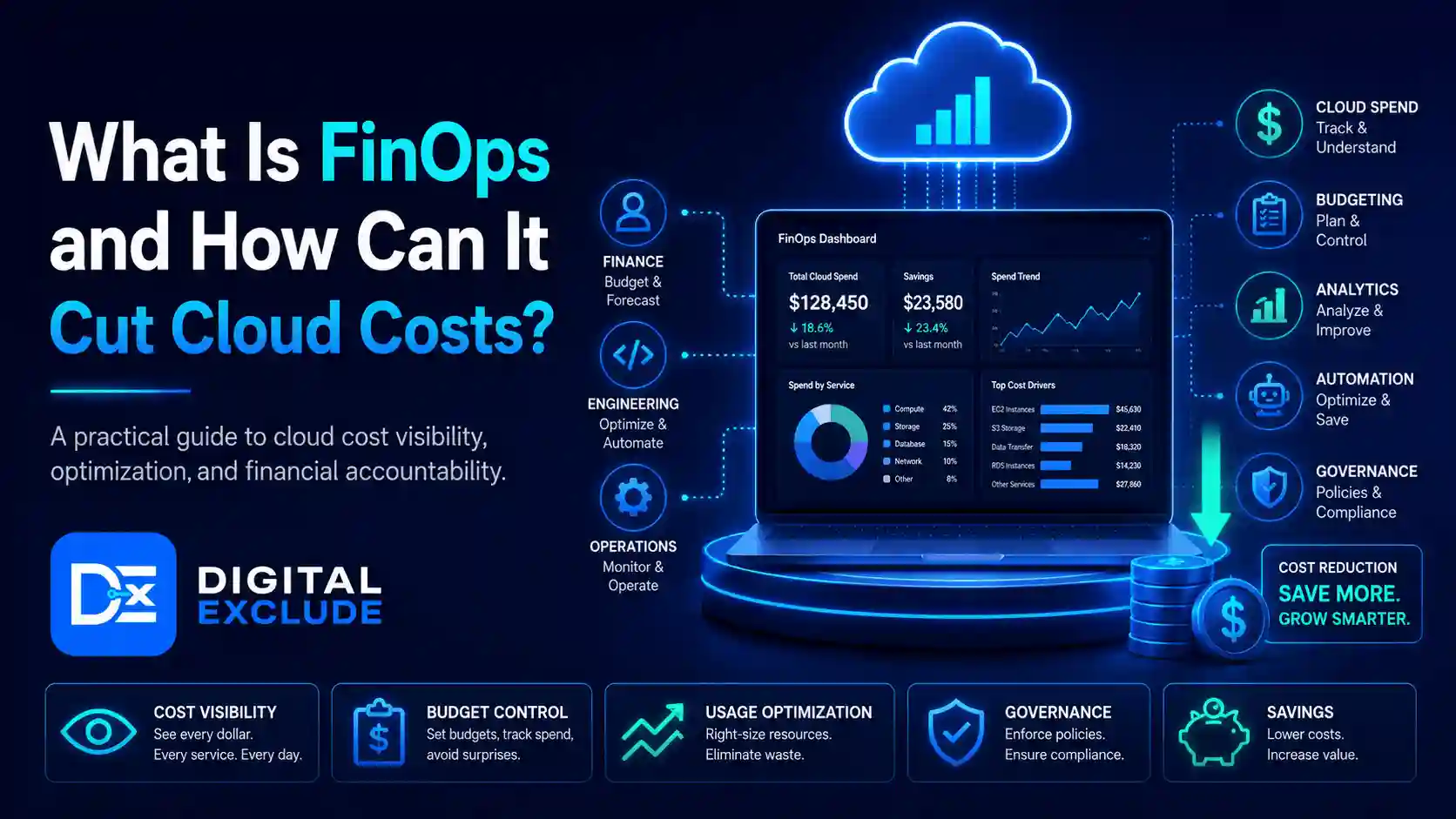
FinOps is a cloud financial management practice that helps teams understand, control, and improve cloud spending. It brings finance, engineering, product, and business teams together so they can make better decisions about cloud usage, performance, and cost.
FinOps can cut cloud costs by finding unused resources, right-sizing servers, setting budgets, improving tagging, using reserved or committed discounts carefully, tracking ownership, and creating cost governance rules. It is not only about reducing the bill. Good FinOps helps teams spend cloud money where it creates business value and stops paying for resources that are idle, oversized, duplicated, or unmanaged.
Introduction
Cloud is flexible, but that flexibility can become expensive. A small business can launch servers, storage, databases, analytics tools, backups, containers, and AI workloads in minutes. The problem is that the monthly bill may grow before anyone understands why.
This is where the question what is FinOps becomes important.
Many small businesses, cloud learners, and finance-aware tech teams are not trying to avoid the cloud. They are trying to use it responsibly. They want faster development, better uptime, and scalable systems, but they also need cost visibility, accountability, and control.
This guide explains FinOps in simple USA English. You will learn what FinOps means, why cloud teams overspend, how FinOps cuts cloud costs, which tools to use, what mistakes to avoid, and how to start a practical cloud cost optimization process without making the team slower.
What Is FinOps?
FinOps is an operating model for managing cloud and technology spend through shared accountability. It helps engineering, finance, product, and business teams work together to understand where money is going, why it is being spent, and whether the cloud spend supports business value.
The FinOps Foundation describes FinOps as a practice that brings financial accountability into technology decision-making. The goal is to help teams make trade-offs between speed, cost, and quality.
In simple terms:
- Finance wants predictable spending.
- Engineering wants reliable systems.
- Product wants fast delivery.
- Business leaders want value.
- FinOps connects these goals.
FinOps is not the same as simple cost-cutting. If a system needs more cloud spend to support customers, FinOps does not automatically say “reduce it.” Instead, it asks better questions:
- Is this resource needed?
- Who owns this cost?
- Is the workload right-sized?
- Is the business getting value?
- Can the same result be achieved at a lower cost?
- Are we paying for idle or forgotten resources?
- Are teams seeing cost data early enough?
FinOps Explained: The Three Core Phases
Most FinOps programs follow three repeating phases: Inform, Optimize, and Operate.
| FinOps Phase | What It Means | Practical Example |
| Inform | Make cloud spend visible and understandable | Show the monthly cost by team, product, service, and environment |
| Optimize | Find ways to reduce waste and improve usage | Stop idle servers, right-size databases, and delete unused storage |
| Operate | Create ongoing rules, reviews, and ownership | Set budgets, alerts, tagging rules, and monthly cost reviews |
FinOps is not a one-time cleanup project. It is a repeatable way of managing cloud cost.
Why FinOps Matters in 2026
FinOps matters in 2026 because cloud usage is no longer limited to basic servers and storage. Teams now spend money on containers, managed databases, serverless functions, analytics platforms, SaaS tools, AI APIs, GPU workloads, data pipelines, backups, observability tools, and multi-cloud environments.
For small businesses, this can create three problems.
First, cloud bills are often hard to read. A business owner may see a large AWS, Azure, or Google Cloud bill but not know which product, team, or workload caused it.
Second, engineers may not see cost impact while building. A developer may choose a larger server, a higher storage tier, or an expensive data transfer pattern without realizing the monthly impact.
Third, finance teams may receive the bill too late. By the time finance sees the cost, the money has already been spent.
FinOps helps solve this by creating better cloud spend management. It gives teams earlier visibility, clearer ownership, and practical rules for cost governance.
Why Do Teams Overspend in Cloud?
Cloud overspending usually happens because of small daily decisions, not one big mistake.
Common causes include:
- Idle virtual machines
- Oversized servers
- Unused storage volumes
- Old snapshots and backups
- Unattached disks
- Poor tagging
- No budget alerts
- Expensive data transfer
- Overprovisioned databases
- Forgotten test environments
- Duplicate tools
- Too many logs retained for too long
- No owner for resources
- Wrong pricing model
- No review of reserved or committed discounts
- AI and analytics workloads running without limits
A simple example: a test server launched for a one week project may keep running for six months. No one notices because no owner is assigned. FinOps makes that waste visible.
How Can FinOps Cut Cloud Costs?
FinOps cuts cloud costs by combining visibility, ownership, optimization, and governance.
1. Make Cloud Costs Visible
You cannot reduce what you cannot see.
Start by answering:
- What is our total cloud spend this month?
- Which service costs the most?
- Which team owns each cost?
- Which environment costs more, production or development?
- Which resources are idle?
- Which costs increased compared with last month?
- Which projects do not have tags?
Useful first report:
| Cost View | Why It Helps |
| Cost by service | Shows which cloud services drive spend |
| Cost by team | Creates ownership |
| Cost by environment | Finds expensive non-production workloads |
| Cost by project | Connects spend to business value |
| Cost trend by month | Shows growth or spikes |
| Untagged resources | Finds unmanaged spend |
2. Use Tagging for Cost Ownership
Tagging is one of the most important FinOps basics.
A tag is a label added to cloud resources. It helps show who owns the resource and why it exists.
Useful tags:
| Tag Name | Example Value |
| owner | marketing-team |
| environment | production |
| project | customer-portal |
| cost-center | finance-2026 |
| application | ecommerce-site |
| business-unit | sales |
| expiration-date | 2026-07-30 |
Without tags, teams may spend hours trying to understand the bill. With tags, cloud spend becomes easier to assign.
Practical Tip
Make tags mandatory for new resources. If a resource does not have an owner tag, it should be flagged for review.
3. Stop Idle and Unused Resources
This is usually the fastest cost-saving opportunity.
Look for:
- Idle virtual machines
- Unattached disks
- Old load balancers
- Unused IP addresses
- Old snapshots
- Test databases
- Stale Kubernetes clusters
- Unused storage buckets
- Development resources running overnight
- Old logs with long retention
Example
A small SaaS team finds three development servers running 24/7. Developers only use them during business hours. By scheduling them to shut down after work, the team cuts waste without affecting customers.
4. Right-Size Cloud Resources
Right-sizing means matching the cloud resource size to actual usage.
For example, a team may use a large virtual machine, but monitoring shows CPU usage is usually below 10 percent. That server may be oversized.
Right-sizing can apply to:
- Virtual machines
- Databases
- Kubernetes nodes
- Storage tiers
- Memory allocation
- Serverless configuration
- Container limits
Be Careful
Do not downsize production systems without checking performance, traffic patterns, and failover needs. Cost savings should not break reliability.
5. Use Reserved Instances or Committed Discounts Carefully
Cloud providers offer discounts when you commit to usage for a period of time. These can reduce costs, but they are not always the right first step.
Use commitments when:
- Usage is stable
- Workload is predictable
- The team understands demand
- The service will run long-term
- Finance approves the commitment
Avoid commitments when:
- The workload is experimental
- Usage changes often
- Architecture may change soon
- The team does not track utilization
- You are only guessing future demand
Practical Tip
Clean up waste before buying commitments. Otherwise, you may lock in discounts for resources you should not be using.
6. Set Budgets and Alerts
Budgets help teams notice cost issues early.
Set alerts for:
- Monthly spend crossing 50 percent, 80 percent, and 100 percent
- Daily spend spikes
- Untagged resource creation
- New expensive services
- Data transfer increases
- AI API usage spikes
- Storage growth
- Non-production spend
A budget alert does not reduce costs by itself. It works because someone is assigned to act on it.
7. Create Cost Governance Rules
Cost governance means creating rules that prevent waste before it happens.
Examples:
- Every resource must have an owner tag.
- Development servers should shut down after work.
- Old snapshots should be reviewed monthly.
- Production databases require approval before resizing.
- Large GPU instances require manager approval.
- New cloud services must include cost estimates.
- Logs should have approved retention periods.
- Budgets must be created for new projects.
Governance should not slow down every small task. The goal is to stop expensive mistakes, not block normal development.
8. Review Cloud Spend Every Month
A monthly cloud cost review keeps FinOps practical.
Include:
- Finance owner
- Engineering lead
- Product owner
- Cloud or DevOps person
- Business stakeholder, if needed
Review:
- Total spend
- Top cost drivers
- Month-over-month changes
- Untagged resources
- Idle resources
- Optimization opportunities
- Budget alerts
- Planned growth
- Actions and owners
A good review ends with clear actions, not just discussion.
Practical FinOps Tutorial: First 30 Days
Week 1: Get Visibility
Start with basic reporting.
Tasks:
- Open your cloud billing dashboard.
- Check total spend for the last 3 months.
- List the top 10 most expensive services.
- Find untagged resources.
- Separate production and non-production spend.
- Identify the largest month-over-month increase.
Output:
- A simple cloud cost summary
- Top cost drivers
- First list of unknown or unowned costs
Week 2: Find Waste
Look for easy wins.
Check:
- Idle servers
- Old disks
- Unused snapshots
- Forgotten test environments
- Logs with long retention
- Unused storage buckets
- Overprovisioned databases
- Non-production workloads running 24/7
Output:
- Waste removal list
- Owner for each item
- Risk level before deletion
- Expected monthly saving estimate
Week 3: Add Ownership and Alerts
Set basic governance.
Tasks:
- Define required tags.
- Create budget alerts.
- Assign owners to major services.
- Create alert rules for cost spikes.
- Document who acts on alerts.
- Add expiry dates to temporary resources.
Output:
- Tagging policy
- Budget alert plan
- Ownership table
- Response process
Week 4: Optimize Safely
Make changes carefully.
Tasks:
- Stop or delete confirmed unused resources.
- Right size low risk workloads.
- Schedule non production shutdowns.
- Review storage tiers.
- Review log retention.
- Check commitment discount opportunities.
- Track savings and risks.
Output:
- Final action report
- Savings estimate
- Next month plan
- Risks to monitor
FinOps Tools for Cloud Cost Management
You do not need a costly tool to start FinOps. Start with the tools already available in your cloud platform.
| Cloud Platform | Useful Native Tools | What They Help With |
| AWS | AWS Cost Explorer, AWS Budgets, Cost and Usage Report, Compute Optimizer | Cost trends, budgets, detailed usage, right-sizing |
| Microsoft Azure | Microsoft Cost Management, Azure Advisor, budgets, tags | Cost tracking, recommendations, alerts, governance |
| Google Cloud | Cloud Billing, Budgets and alerts, FinOps hub, Recommender | Cost visibility, recommended optimizations, and forecasting |
| Multi Cloud | CloudHealth, Apptio, Finout, nOps, Datadog Cloud Cost Management | Multi-cloud visibility, reporting, allocation, and recommendations |
Tool Selection Tip
Start with native cloud tools first. Move to third-party tools only when you need multi-cloud reporting, deeper allocation, automation, or finance-level dashboards.
Real World Examples
Example 1: Small Business With Rising AWS Bill
A small e-commerce company sees its AWS bill rise every month.
What they find:
- Development servers running all weekend
- Old snapshots are kept for months
- Unattached storage volumes
- No owner tags
- Logs retained longer than needed
FinOps actions:
- Add owner and environment tags
- Shut down development servers after work
- Delete unused storage after approval
- Set AWS Budgets alerts
- Review Cost Explorer weekly
Result:
The team reduces waste without changing the production website.
Example 2: Startup Using Cloud Databases
A startup runs a managed database on a large instance.
What they find:
- CPU usage is low on most days
- Memory usage is stable
- Storage is growing due to old logs
- No one reviews the database cost monthly
FinOps actions:
- Review database metrics
- Right-size the database after testing
- Reduce log retention
- Set alerts for storage growth
- Add a review before scaling up
Result:
The database cost becomes more predictable, and the team avoids unnecessary upgrades.
Example 3: Marketing Team Using AI and Analytics Tools
A marketing team uses cloud analytics and AI APIs.
What they find:
- Test jobs are running repeatedly
- AI API calls are not tracked by campaign
- Data exports create extra storage costs
- Reports run even when not needed
FinOps actions:
- Add campaign-level tracking
- Limit test job frequency
- Set AI usage alerts
- Delete old exports
- Review dashboard refresh schedules
Result:
The team connects AI and analytics spend to actual campaign value.
Example 4: Cloud Learner Practicing on Free Tier
A learner uses cloud free tier resources but forgets to shut down services.
What they find:
- Free tier limits were exceeded
- A database continued running
- Storage and network charges appeared
- Alerts were not configured
FinOps actions:
- Set a budget alert
- Use small test resources
- Delete unused resources after practice
- Create a cleanup checklist
Result:
The learner avoids surprise bills.
Common Mistakes to Avoid
Mistake 1: Treating FinOps as Only a Finance Job
Finance can read the bill, but engineers control many cloud decisions.
Better approach:
Make FinOps a shared practice between finance, engineering, product, and business teams.
Mistake 2: Cutting Costs Without Understanding Impact
Stopping resources blindly can break systems.
Better approach:
Check ownership, usage, backups, dependencies, and business impact before deleting or downsizing.
Mistake 3: Ignoring Tags
Without tags, cost allocation becomes guesswork.
Better approach:
Create mandatory tags for owner, environment, project, and cost center.
Mistake 4: Buying Discounts Too Early
Reserved or committed discounts can help, but they can also lock in bad decisions.
Better approach:
Remove waste and understand usage before making commitments.
Mistake 5: No Alert Ownership
A budget alert is useless if no one acts on it.
Better approach:
Assign a person or team to review each alert.
Mistake 6: Forgetting Non-Production Costs
Development, staging, testing, and training environments can create large bills.
Better approach:
Schedule shutdowns, set smaller resource sizes, and review non-production spend separately.
Mistake 7: Only Looking at Monthly Bills
Monthly bills show what has already happened.
Better approach:
Use daily alerts, weekly reviews, and forecast checks to catch issues early.
Best Practices: Step-by-Step Tips
Step 1: Build a Basic Cost Dashboard
Track:
- Monthly cloud spend
- Spend by service
- Spend by team
- Spend by environment
- Untagged resources
- Top cost increases
- Budget status
Keep it simple at first. A basic dashboard is better than no visibility.
Step 2: Create a Tagging Policy
Start with four required tags:
- owner
- environment
- project
- cost-center
Then add more when needed.
Step 3: Set Budget Alerts
Create alerts at:
- 50 percent of budget
- 80 percent of budget
- 100 percent of budget
- sudden daily spikes
Make sure alerts go to the right people.
Step 4: Review Idle Resources Weekly
Check for:
- Stopped but billable resources
- Idle servers
- Unused disks
- Old snapshots
- Forgotten test environments
- Unused IP addresses
Step 5: Right Size Carefully
Before changing resource size:
- Check usage history
- Check peak traffic
- Check business hours
- Test in staging
- Create rollback plan
- Monitor after change
Step 6: Control AI and Data Costs
In 2026, AI and data workloads can grow quickly.
Watch:
- AI API calls
- GPU instances
- Vector databases
- Data warehouse queries
- Logging volume
- Storage growth
- Data transfer
- Frequent dashboard refreshes
Step 7: Add Cost Review to Engineering Workflow
Before launching a new feature, ask:
- What cloud services will it use?
- What is the expected monthly cost?
- What happens if usage doubles?
- What is the alert threshold?
- Who owns the spend?
- Can it be turned off if needed?
Step 8: Use a FinOps Maturity Approach
Start small.
| Stage | Focus |
| Crawl | Visibility, tags, budgets, waste cleanup |
| Walk | Ownership, recurring reviews, right sizing, alerts |
| Run | Forecasting, automation, unit economics, advanced governance |
A small business does not need a large FinOps team to begin. It needs visibility, ownership, and repeatable habits.
FinOps Checklist for Small Teams
| Task | Done? |
| Review last 3 months of cloud spend | |
| Identify top 10 cost drivers | |
| Create required tags | |
| Assign resource owners | |
| Set monthly budgets | |
| Add alerts for spend spikes | |
| Find idle resources | |
| Review storage and backups | |
| Check non production environments | |
| Review AI, analytics, and data costs | |
| Create monthly cost review meeting | |
| Track savings and risks |
FinOps vs Traditional Cost Cutting
| Area | Traditional Cost Cutting | FinOps Approach |
| Main goal | Reduce spend quickly | Maximize business value from spend |
| Ownership | Finance-led | Shared by finance, engineering, and business |
| Timing | After bill arrives | Ongoing and proactive |
| Visibility | High-level billing | Team, project, service, and resource level |
| Risk | May hurt performance | Balances cost, speed, and quality |
| Process | One time cleanup | Continuous practice |
| Culture | Blame focused | Accountability focused |
Pros and Cons of FinOps
| Pros | Cons |
| Improves cloud cost visibility | Needs team discipline |
| Reduces waste | Requires tagging and process changes |
| Helps finance and engineering work together | Initial setup can take time |
| Supports better forecasting | Wrong decisions can affect performance |
| Encourages cost ownership | Needs regular reviews |
| Helps small teams avoid surprise bills | Some tools can add cost |
| Improves cloud governance | Requires executive support as spend grows |
Final Recommendation
If your team is overspending in the cloud, do not start by randomly deleting resources. Start with visibility.
The best first FinOps steps are:
- Review the last 3 months of cloud spend.
- Identify top cost drivers.
- Add owner and environment tags.
- Set budget alerts.
- Find idle resources.
- Right-size low-risk workloads.
- Review storage, backups, and logs.
- Assign owners for cost alerts.
- Hold a monthly cloud cost review.
- Track savings and performance impact.
For small businesses, FinOps does not need to be complicated. Start with native tools such as AWS Cost Explorer, Azure Cost Management, or Google Cloud Billing. Add third-party tools only when your cloud setup becomes too large or multi-cloud reporting becomes difficult.
The best FinOps practice is practical, shared, and ongoing. It helps teams reduce waste without slowing down useful cloud work.
FAQs
What is FinOps?
FinOps is a cloud financial management practice that helps finance, engineering, product, and business teams manage cloud spend together. It focuses on cost visibility, accountability, optimization, and business value.
How does FinOps cut cloud costs?
FinOps cuts cloud costs by finding idle resources, right sizing workloads, improving tagging, setting budgets, using alerts, reviewing storage and logs, and creating cost governance rules.
Is FinOps only for large companies?
No. Small businesses can use FinOps by starting with simple steps such as monthly cost reviews, budget alerts, tagging, and cleanup of unused cloud resources.
What tools are used for FinOps?
Common FinOps tools include AWS Cost Explorer, AWS Budgets, Microsoft Cost Management, Azure Advisor, Google Cloud Billing, Google Cloud FinOps hub, and third-party cloud cost management platforms.
What is the difference between FinOps and cloud cost optimization?
Cloud cost optimization focuses on reducing or improving specific cloud costs. FinOps is broader. It includes people, process, ownership, governance, reporting, and ongoing decision-making around cloud value.
Conclusion
What is FinOps? FinOps is the practice of managing cloud spend through shared ownership, cost visibility, optimization, and governance. It helps teams understand where cloud money goes and how to use it more responsibly.
For small businesses, cloud learners, and finance-aware tech teams, FinOps is useful because cloud bills can grow quickly when resources are idle, oversized, untagged, or unmanaged. The goal is not to stop using cloud. The goal is to spend smarter.
Start with visibility, tags, budgets, alerts, idle resource cleanup, right sizing, and monthly cost reviews. Over time, FinOps can help your team reduce waste, improve cloud spend management, and make better decisions about performance, growth, and cost.