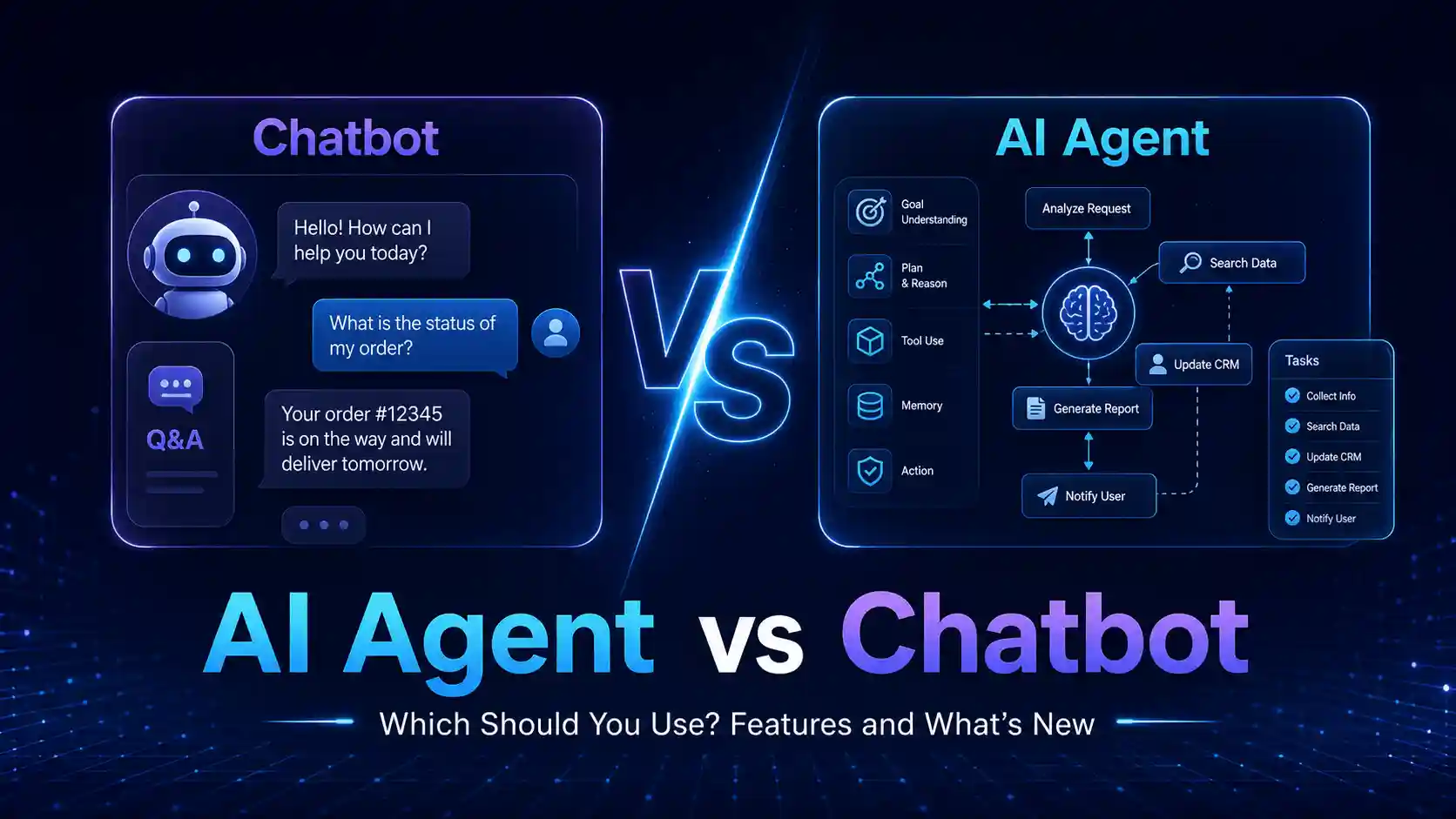
If you are comparing ai agent vs chatbot, the main difference is control. A chatbot answers questions. An AI agent can plan, use tools, and take actions. Automation tools follow predefined rules and move work between apps.
For small businesses and operations teams, the right choice depends on the task. If you only need customer FAQs, use a chatbot. If you need repeatable app-to-app workflows, use automation tools. If you need a system that can reason through multi-step tasks, use an AI agent with human approval and clear limits.
Many buyers get confused because vendors use words like “assistant,” “agent,” “bot,” and “automation” loosely. This guide breaks the decision down in practical terms so you can choose the safest and most cost-effective option for your workflow.
Quick Answer
Use a chatbot when users need quick answers through conversation. Use automation tools when the task follows clear rules, such as “when a form is submitted, create a CRM record.” Use an AI agent when the task requires reasoning, planning, tool use, and decision-making across multiple steps.
For most small businesses, the best starting point is not a fully autonomous AI agent. Start with simple automation or a chatbot, then add agentic AI only where the workflow is complex enough to justify extra cost, testing, privacy controls, and monitoring.
What Does AI Agent vs Chatbot vs Automation Mean?
What Is a Chatbot?
A chatbot is software that simulates a conversation with a user. IBM describes a chatbot as a computer program that simulates human conversation and may use NLP or generative AI to understand and respond to questions. You can read IBM’s explainer on what a chatbot is.
A chatbot is useful when the main job is answering, guiding, or collecting information.
Common chatbot examples:
| Use Case | Example |
| Customer support | “Where is my order?” |
| Website help | “Which plan should I choose?” |
| Student support | “What is the assignment deadline?” |
| HR helpdesk | “How do I apply for leave?” |
| Sales qualification | “What is your budget and company size?” |
A chatbot may be rule-based, AI-based, or connected to company documents. But it usually waits for the user to ask something.
What Is an AI Agent?
An AI agent is an AI system that can pursue a goal, plan steps, use tools, and take action on behalf of a user. Google Cloud explains that AI agents use AI to complete tasks for users and can show reasoning, planning, and memory. IBM also explains that AI agents can autonomously perform tasks by designing workflows with available tools.
A simple AI agent may:
- Read a customer email.
- Understand the request.
- Check CRM history.
- Search internal documents.
- Draft a reply.
- Create a task.
- Ask a human to approve before sending.
That is why agentic AI vs chatbot is not just a naming difference. The real difference is action.
What Are Automation Tools?
Automation tools connect apps and run predefined workflows. They are best when the steps are predictable.
Example:
If a lead fills out a form, add the lead to Google Sheets, create a CRM contact, and send a Slack notification.
This is not “thinking.” It is workflow logic.
Microsoft Power Automate describes its platform as a way to automate workflows and business processes across apps, systems, and websites. That is the core idea behind automation tools.
For a deeper small business view, Digital Exclude has a practical guide on AI automation for small business.
Why This Matters in 2026
AI tools are now being added to CRMs, helpdesk platforms, email tools, browsers, spreadsheets, project management apps, and customer support systems. This creates a real buying problem: many tools claim to be “AI-powered,” but they solve different problems.
A startup, student team, or SMB can waste money by buying an AI agent when a simple automation would work. A support team can also disappoint customers by using a chatbot where a real workflow automation is needed.
The risk is higher in 2026 because AI systems can now connect to documents, calendars, databases, email, payment tools, code editors, and cloud apps. That gives them more usefulness, but also more security and privacy risk. If an AI agent has too much access, one bad instruction, wrong output, or weak permission setup can create real damage.
If you are working with connected AI tools, read Digital Exclude’s guide on prompt injection because this is one of the most important AI security risks for agents that read external content.
AI Agent vs Chatbot: What Is the Real Difference?
Short answer: A chatbot talks. An AI agent can act. Automation follows rules.
| Feature | Chatbot | AI Agent | Automation Tools |
| Main purpose | Answer questions | Complete goals | Run repeatable workflows |
| User input | Usually conversational | Goal or task based | Trigger based |
| Decision-making | Limited | Higher | Rule based |
| Tool access | Sometimes | Often required | App integrations |
| Autonomy | Low to medium | Medium to high | Low |
| Best for | FAQs, support, guidance | Research, operations, task handling | Forms, alerts, CRM updates, approvals |
| Risk level | Medium | Higher | Low to medium |
| Setup complexity | Low to medium | Medium to high | Low to medium |
| Human review needed | Sometimes | Strongly recommended | For sensitive workflows |
| Cost control | Easier | Harder | Easier |
AI Assistant vs AI Agent: Are They the Same?
No. An AI assistant usually helps a person complete work. An AI agent can perform parts of the work more independently.
A useful way to think about it:
| Term | Simple Meaning | Example |
| AI assistant | Helps when asked | Draft this email |
| Chatbot | Talks with users | Answer refund questions |
| AI agent | Plans and acts | Review refund request, check order status, draft response, create ticket |
| Automation tool | Runs fixed steps | When ticket is created, notify support lead |
An AI assistant is often human-led. An AI agent is more workflow-led.
Main Practical Guide: Which One Should You Use?
Use a Chatbot When the Task Is Mostly Conversation
A chatbot is the right choice when users need answers, not complex action.
Choose a chatbot if:
- Customers ask repeated questions.
- Students need quick help with schedules or resources.
- Employees ask HR or IT questions.
- Users need help choosing a product or plan.
- You want a guided website experience.
- The bot can answer from a controlled knowledge base.
Example:
A small online course provider gets the same questions every day:
- What is the course duration?
- Is there a certificate?
- What is the refund policy?
- Can beginners join?
A chatbot can answer these quickly and reduce manual replies.
Be careful when:
- The chatbot gives legal, financial, or medical advice.
- The chatbot answers from outdated documents.
- The chatbot is allowed to make promises about refunds, pricing, or guarantees.
- Users believe the chatbot is a human.
Use Automation Tools When the Workflow Is Predictable
Automation tools are best when the process is clear.
Choose automation tools if:
- The task follows fixed rules.
- You need to connect apps.
- There is no need for reasoning.
- You want low cost and reliability.
- The workflow repeats often.
- You can define the trigger and action clearly.
Example:
A small agency wants this workflow:
- Lead submits a website form.
- Details go to Google Sheets.
- Lead is added to the CRM.
- Sales owner gets a Slack alert.
- Follow-up email draft is created.
This is classic ai workflow automation if AI is used to summarize the lead or classify the request. Without AI, it is still basic automation.
For teams choosing work tools, Digital Exclude’s list of best productivity apps can help you connect the right task, notes, project, and team communication apps.
Use an AI Agent When the Task Needs Planning and Tool Use
An AI agent is useful when the work is not just “if this, then that.”
Choose an AI agent if:
- The task has multiple possible paths.
- The system needs to reason over data.
- The work involves several tools.
- The agent needs memory or context.
- The task changes depending on the result.
- A human can review important actions.
Example:
A support operations team wants an AI system to:
- Read a customer complaint.
- Check the order in CRM.
- Review the refund policy.
- Look at past support tickets.
- Suggest the best response.
- Create a follow-up task.
- Ask a manager before approving a refund.
That is closer to an AI agent than a chatbot.
For more background, Digital Exclude has a detailed explainer on AI agents and another guide on MCP in AI, which explains how agents can connect to external tools and resources.
Decision Framework: Chatbot, Automation, or AI Agent?
Ask these questions before buying any tool.
| Question | If Yes | Best Fit |
| Is the user mainly asking questions? | Yes | Chatbot |
| Does the task follow fixed steps? | Yes | Automation tools |
| Does the task need reasoning or planning? | Yes | AI agent |
| Does the tool need to use email, CRM, database, or calendar? | Yes | AI agent or automation |
| Is the workflow high risk? | Yes | Human approval required |
| Is the budget small? | Yes | Start with automation or chatbot |
| Is the task repetitive and low risk? | Yes | Automation tools |
| Does the task need judgment? | Yes | AI agent with guardrails |
Practical Tutorial: How to Choose and Build the Right Workflow
Step 1: Write the Workflow in Plain English
Before choosing a tool, write the task like this:
When [trigger] happens, the system should [action], using [data source], and ask [human] before [sensitive action].
Example:
When a new customer complaint arrives, the system should summarize the issue, check the order status, suggest a response, and ask the support manager before sending anything.
This makes the tool decision much clearer.
Step 2: Mark Each Step as Answer, Rule, or Judgment
Use this table:
| Workflow Step | Type | Best Tool |
| Answer refund policy question | Answer | Chatbot |
| Add lead to CRM | Rule | Automation |
| Decide priority based on customer history | Judgment | AI agent |
| Send internal notification | Rule | Automation |
| Draft custom response | Judgment | AI agent |
| Approve refund | Sensitive action | Human approval |
This prevents overbuilding. Many workflows only need one agent step, not a fully autonomous system.
Step 3: Start With the Lowest Risk Version
A safe version could be:
- Chatbot answers common questions.
- Automation creates tickets.
- AI agent drafts summaries.
- Human approves customer-facing replies.
Avoid giving the agent full sending, deleting, refunding, or payment access on day one.
Step 4: Connect Only the Tools It Needs
Do not connect every app because the vendor allows it.
Start with:
- Helpdesk
- CRM
- Knowledge base
- Calendar
- Project management tool
- Email draft access, not send access
Limit permissions. If the agent only needs to read order status, do not give it admin access to the whole CRM.
Step 5: Add Human Approval for Sensitive Actions
Use approval for:
- Sending external emails
- Refunds
- Discounts
- Account changes
- Deleting data
- Updating customer records
- Accessing private documents
- Financial decisions
This is where many small teams get AI wrong. The goal is not to make every step autonomous. The goal is to remove repetitive work while keeping control.
Step 6: Test With Real Examples
Test using 20 to 50 real workflow examples.
Check:
- Did it understand the request?
- Did it use the correct data?
- Did it follow the policy?
- Did it ask for approval at the right time?
- Did it make up missing details?
- Did it expose private data?
- Did it cost too much per task?
Step 7: Track Cost and Accuracy
Track these numbers:
| Metric | Why It Matters |
| Cost per task | Shows whether AI is worth using |
| Human review rate | Shows how often staff still need to fix it |
| Error rate | Shows risk |
| Time saved | Shows business value |
| Escalation rate | Shows where automation fails |
| Customer satisfaction | Shows user impact |
| Token or usage cost | Helps control AI spend |
What Is a Multi-Agent System in Python?
A multi-agent system in Python is a setup where multiple AI agents handle different roles in the same workflow. One agent may plan the task, another may research information, another may write a response, and another may review the output.
For this article, you do not need to build a Python project to understand the idea. The practical point is simple: complex workflows often work better when responsibilities are separated.
Example roles:
| Agent Role | Job |
| Planner | Breaks the task into steps |
| Researcher | Looks up facts or internal data |
| Writer | Drafts the output |
| Reviewer | Checks quality, risk, and policy |
| Executor | Takes approved action |
Small businesses do not always need multiple agents. But the structure helps you think clearly about responsibilities.
When Should You Use Multiple Agents Instead of One AI Assistant?
Use multiple agents only when one assistant becomes too broad or unreliable.
Good reasons to use multiple agents:
- The workflow has separate stages.
- One agent keeps missing policy checks.
- You need review before action.
- The task uses different tools or data sources.
- You need auditability.
- The workflow is important enough to justify extra cost.
Avoid multiple agents when:
- The task is simple.
- You only need FAQ answers.
- The workflow is low value.
- You have no testing process.
- You cannot monitor cost.
- You do not have clean data.
Basic Architecture of an AI Workflow
A practical AI workflow can look like this:
- Trigger: A form, email, chat, ticket, or scheduled task starts the workflow.
- Input check: The system checks if the request is valid.
- Context lookup: The system reads approved data sources.
- AI step: The chatbot, assistant, or agent processes the task.
- Decision rule: The system decides whether to continue, escalate, or ask a human.
- Action: The workflow creates a draft, updates a record, or sends a notification.
- Review: A human checks sensitive outputs.
- Logging: The system records what happened.
This structure works for AI agents, chatbots, and automation tools.
Tools and Libraries Needed
For no-code teams:
| Need | Tool Type |
| Website FAQ | Chatbot builder |
| CRM updates | Automation platform |
| Email classification | AI workflow automation |
| Internal search | Knowledge base plus AI assistant |
| Customer support | Helpdesk chatbot |
| Approval workflows | Project management or automation tool |
For technical teams:
| Need | Tool Type |
| Agent logic | Agent framework or custom Python |
| Model access | LLM API |
| Tool connection | API integrations or MCP |
| Data retrieval | Vector database or search |
| Monitoring | Logs, analytics, cost tracking |
| Security | Permission control, audit logs, prompt injection testing |
If your team is still learning AI basics, Digital Exclude’s Artificial Intelligence Course Guide can help readers understand chatbots, agents, AI workflows, and model limitations.
Agent Roles: Planner, Researcher, Writer, Reviewer
If you build an AI agent workflow, separate the roles clearly.
| Role | What It Does | Example |
| Planner | Breaks down the task | “First check CRM, then refund policy.” |
| Researcher | Finds relevant data | “Order was delivered 2 days late.” |
| Writer | Drafts the response | “Sorry for the delay. Here are next steps.” |
| Reviewer | Checks accuracy and risk | “Do not promise refund without approval.” |
| Human approver | Makes final decision | Support manager reviews the draft |
This setup is useful because agents can make mistakes. A reviewer step helps catch wrong assumptions before they reach the customer.
Example Workflow: Customer Support
Scenario
A small ecommerce business receives 100 customer messages per day.
Option 1: Chatbot
Best for:
- Order tracking questions
- Return policy
- Delivery timelines
- Product FAQs
Risk:
- May fail when a user has a complex complaint.
Option 2: Automation Tools
Best for:
- Creating tickets
- Sending order IDs to CRM
- Assigning support owners
- Sending internal alerts
Risk:
- Cannot understand messy customer language without AI.
Option 3: AI Agent
Best for:
- Reading complaint details
- Checking order history
- Reviewing policy
- Drafting a personalized response
- Escalating high-risk cases
Risk:
- Needs privacy rules, permissions, testing, and approval controls.
Best Setup
Use all three:
- Chatbot for simple FAQs.
- Automation for ticket routing.
- AI agent for complex cases.
- Human approval for refunds and sensitive replies.
Real World Examples
Example 1: Local Service Business
A local repair company gets leads from its website.
Best setup:
- Automation tool captures the lead.
- AI assistant summarizes the request.
- Chatbot answers service area questions.
- Human calls high-value leads.
Do not use a full AI agent if the only task is form routing.
Example 2: Student Support Team
A college department receives repeated student questions.
Best setup:
- Chatbot answers timetable, fee, and document questions.
- Automation creates tickets for unresolved issues.
- Human staff handle exceptions.
An AI agent may help later if it can safely check student records with permission controls.
Example 3: Small SaaS Startup
A SaaS company wants better onboarding.
Best setup:
- Chatbot answers product questions.
- Automation sends onboarding emails.
- AI agent checks user activity and suggests next steps for customer success.
Be careful with customer data. Do not let the agent expose private account details in chat.
Example 4: Operations Team
An operations team handles invoices, approvals, and vendor emails.
Best setup:
- Automation routes invoices.
- AI agent extracts key details and flags missing information.
- Human approves payments.
- Audit logs record every action.
Do not allow the agent to approve payments without human review.
Common Mistakes to Avoid
Mistake 1: Buying an AI Agent for a Simple FAQ Problem
If customers ask the same 30 questions every day, start with a chatbot. A full agent may add cost and risk without much benefit.
Mistake 2: Using Automation Where Judgment Is Needed
Automation tools follow rules. They do not understand messy context unless AI is added. Do not use simple automation to decide refund eligibility, customer priority, or compliance risk.
Mistake 3: Giving Agents Too Much Access
An agent that can read email, access CRM, update records, and send messages needs strict controls. Limit access by task.
Mistake 4: No Human Review
AI agents should not take sensitive actions alone. Use approval for external replies, payments, refunds, account changes, and private data handling.
Mistake 5: Ignoring Prompt Injection
OWASP lists prompt injection as a major risk for LLM applications. The risk is serious when an AI tool reads emails, websites, PDFs, tickets, or documents that may contain malicious instructions. Review OWASP’s page on LLM prompt injection before giving agents tool access.
Mistake 6: Not Tracking AI Costs
AI agents can be more expensive than chatbots or simple automation because they may call models, search documents, use tools, and retry tasks. Track cost per completed task.
Mistake 7: Trusting AI Outputs Without Source Checks
If the agent gives a price, policy, date, or customer-specific detail, verify the source. This is especially important for customer support, finance, legal, health, and education workflows.
Security and Cost Considerations
Security Checklist
Before using AI agents or AI workflow automation, check:
| Security Question | Why It Matters |
| What data can the tool access? | Prevents overexposure |
| Can it send messages externally? | Prevents accidental communication |
| Can it change records? | Prevents data damage |
| Is human approval required? | Reduces operational risk |
| Are actions logged? | Supports audit and review |
| Can users inject instructions? | Reduces prompt injection risk |
| Can the tool access private documents? | Protects sensitive data |
| Can permissions be limited by role? | Improves control |
Cost Checklist
Track:
- Monthly subscription cost
- AI usage cost
- Cost per task
- Number of model calls
- Workflow failures
- Human review time
- Integration costs
- Training and setup time
- Data storage or retrieval cost
A cheap chatbot may be enough for a website FAQ. An agent may be worth the extra cost only when it saves real staff time or improves workflow quality.
Best Practices: Step-by-Step Tips
Step 1: Start With One Workflow
Do not automate the whole business at once. Pick one painful workflow.
Good starting points:
- Lead follow-up
- Support ticket summary
- FAQ chatbot
- Meeting notes
- Invoice routing
- Task assignment
- Internal knowledge search
Step 2: Choose the Simplest Working Tool
Use this order:
- Manual checklist
- Basic automation
- Chatbot
- AI workflow automation
- AI agent
- Multi-agent system
This keeps cost and risk under control.
Step 3: Add AI Only Where It Helps
AI is useful for:
- Summarizing
- Classifying
- Drafting
- Searching
- Extracting information
- Comparing policies
- Suggesting next steps
AI is not always needed for:
- Copying data between apps
- Sending alerts
- Updating a spreadsheet
- Creating a ticket
- Assigning a fixed owner
Step 4: Keep a Human in the Loop
Use human review for:
- Customer complaints
- Refunds
- Pricing
- Contracts
- Payments
- HR decisions
- Security alerts
- Account access
- Legal or compliance topics
Step 5: Create a Failure Plan
Decide what happens when the tool is unsure.
Options:
- Escalate to a human
- Ask a clarifying question
- Create a draft only
- Stop the workflow
- Flag the task for review
Step 6: Review Performance Monthly
Check:
- Is it saving time?
- Are users satisfied?
- Are errors decreasing?
- Are costs predictable?
- Are employees bypassing the tool?
- Are there security concerns?
- Does the workflow still match business needs?
Final Recommendation
If you are choosing between ai agent vs chatbot, start with the job to be done.
Use a chatbot if the work is conversational. Use automation tools if the work is predictable and rule-based. Use an AI agent if the work needs reasoning, planning, tool use, and multi-step execution.
For small businesses and operations teams, the safest setup is often a mix:
- Chatbot for simple questions
- Automation tools for repeatable app workflows
- AI agent for complex tasks
- Human approval for sensitive actions
Do not buy the most advanced tool first. Choose the lowest-risk system that solves the real workflow problem.
FAQs
-
What is the main difference between an AI agent and a chatbot?
A chatbot mainly answers questions through conversation. An AI agent can plan steps, use tools, and take actions to complete a task.
-
Is an AI assistant the same as an AI agent?
No. An AI assistant usually helps a person when asked. An AI agent can work through a task with more autonomy, especially when connected to tools and data sources.
-
When should a small business use automation tools instead of AI?
Use automation tools when the task is predictable, such as moving form data to a CRM, sending alerts, creating tickets, or updating spreadsheets.
-
Are AI agents risky?
AI agents can be risky if they have access to sensitive data or can take actions without approval. Use limited permissions, human review, logs, and prompt injection safeguards.
-
Which is cheaper: chatbot, automation, or AI agent?
Basic automation and simple chatbots are usually cheaper to run. AI agents can cost more because they may use models, tools, memory, searches, and multiple workflow steps.
Conclusion
The ai agent vs chatbot decision is really a workflow decision. A chatbot is best for conversation. Automation tools are best for repeatable rules. An AI agent is best for multi-step work that needs reasoning and tool use.
For beginners, SMB teams, and operations teams, the best approach is to start small. Pick one workflow, define the steps, choose the simplest tool, test with real examples, and add human approval before sensitive actions.
AI can reduce repetitive work, but it should not remove judgment where judgment matters. The right setup is not the one with the most features. It is the one that solves the workflow safely, clearly, and at a cost your team can control.